
Hello, we are SEFORAA.

Contact us to ask about the applications, request a quotation, or schedule a demo. Our team is ready to help during business hours.

Schedule a demo

Follow us

SEFORAA Asset Maintenance: CMMS and EAM software for work orders, preventive maintenance and spare parts

Record every asset with its history, schedule preventive maintenance, and manage work orders through to spare parts, so machines do not stop unexpectedly. The application is installed on your company's server, and you can try it yourself through two demos: open-pit mining and subsea contractor.

Planned maintenance, not emergencies

From asset records to completed work orders, in one application

Heavy equipment that stops mid-shift, a pump that leaks when it is needed, or an ROV that has to come aboard the vessel early almost always have one thing in common: their maintenance history is scattered across notebooks, spreadsheets and technicians' memories. As a result, preventive maintenance is missed, spare parts are only looked for after the machine breaks, and maintenance costs are only known long after the event.

SEFORAA Asset Maintenance brings it all together. Assets are recorded with their service history, warranty and cost. Preventive maintenance is scheduled by time or operating hours. Every breakdown or request becomes a work order with clear assignment, and spare parts are drawn from recorded inventory.

  • Asset records with service history, warranty, cost and downtime
  • Work orders from request to Closed, with a status log
  • Preventive maintenance schedules by time or operating hours
  • Spare parts inventory with reorder points
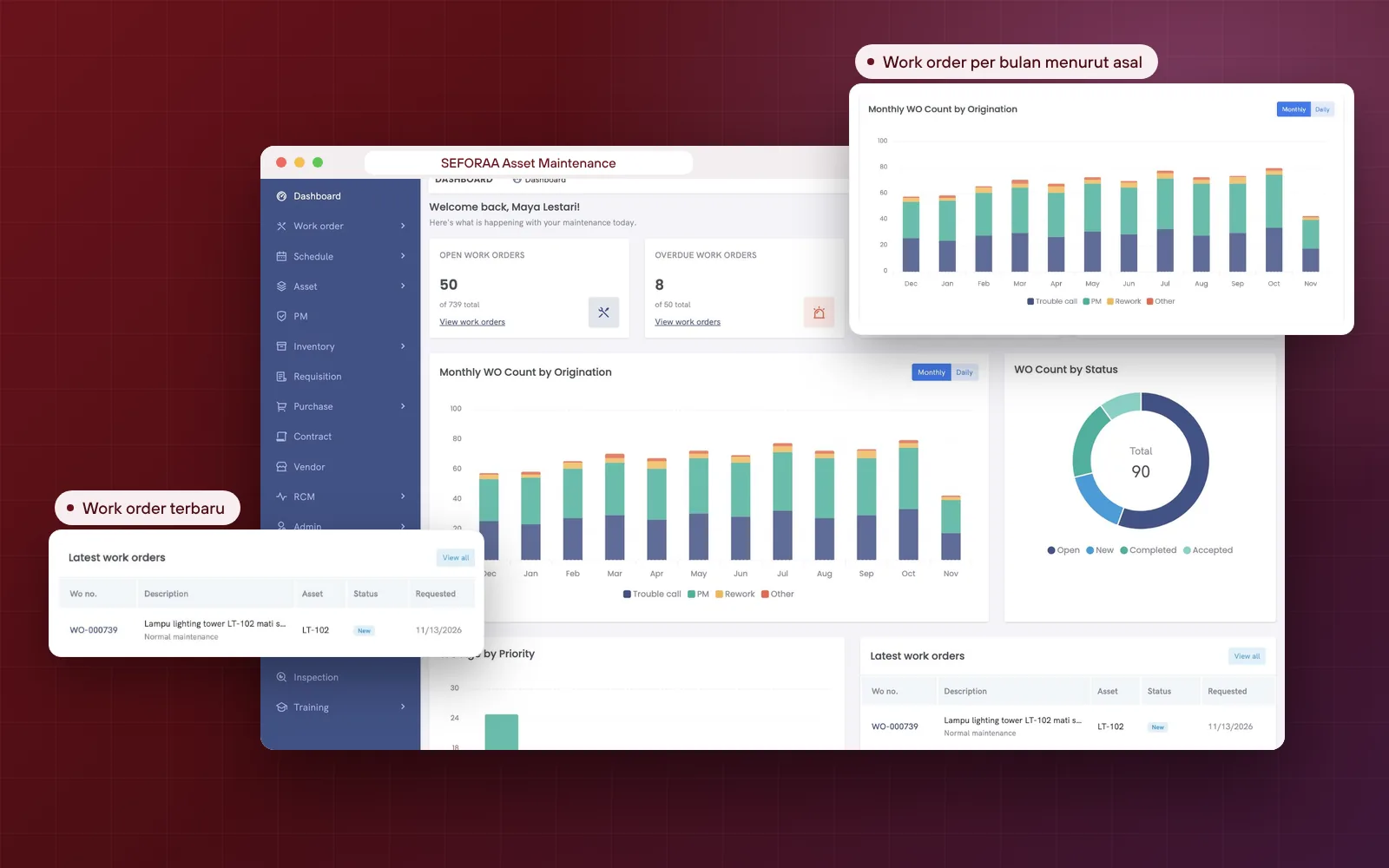
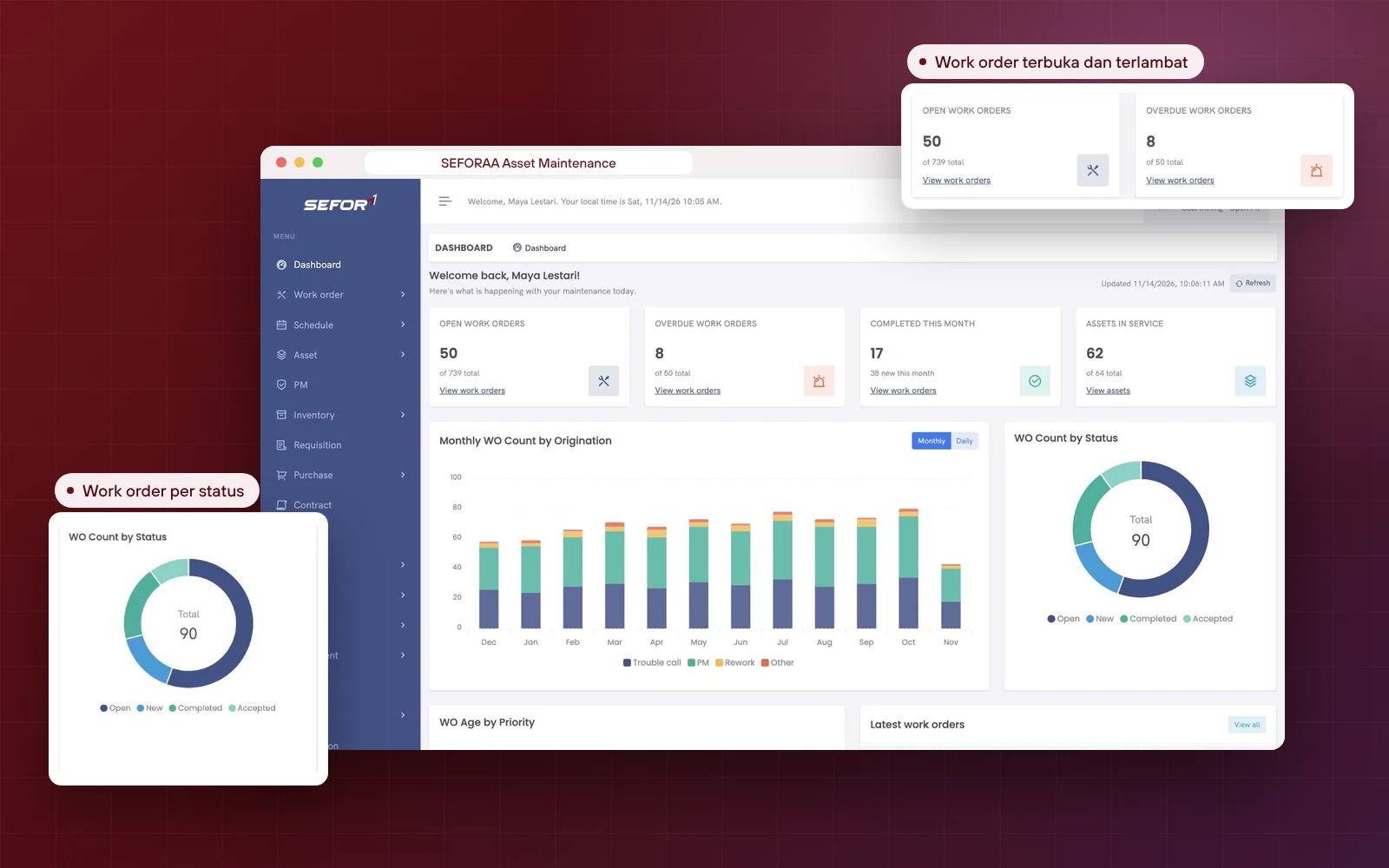
SEFORAA Asset Maintenance dashboard in the open-pit mining demo: open, overdue and completed work orders, assets in operation, a chart of work orders per month by work origin, work orders per status, and latest work orders

Why SEFORAA Asset Maintenance

Asset history, maintenance schedules, work orders and spare parts connected in one application

Six things you can check for yourself in the demo, using open-pit mining and subsea contractor data.

  • Every asset has a history

    Warranty, maintenance cost, service and downtime are stored on the asset's page, not in a technician's notebook.

    WarrantyMaintenance costDowntime
  • Work orders with a clear flow

    From request, assignment and schedule through to Completed, Accepted and Closed, with a status log.

    Status log
  • Preventive maintenance is not missed

    Schedules by time or operating hours, and work orders from PM are issued with the PM as their origin.

    TimeOperating hours
  • Spare parts ready before they are needed

    Stock, reservations and orders are recorded, with a reorder point for every item.

    Reorder point
  • Downtime is visible, not estimated

    Downtime is recorded per asset and per work order, so the impact of breakdowns can be discussed with numbers.

    Per assetPer work order
  • Installed on your own server

    Not a SaaS subscription. Asset data and maintenance history stay on the company's server.

    Not SaaSCompany server

SEFORAA Asset Maintenance features

From asset records to maintenance cost

Filter by group to see the features most relevant to the maintenance, warehouse and procurement teams.

  • Asset records

    Parent and child assets, location, serial number, owner, vendor, manufacturer, warranty, acquisition cost and photos.

    Assets & work orders
  • Work orders

    Work requests, assignment to people or teams, schedule, instructions, labor, spare parts, tools and downtime.

    Assets & work orders
  • Preventive maintenance (PM)

    Schedules by time or meter, duration, working hours, downtime hours and the assigned team.

    Assets & work orders
  • Spare parts inventory

    Stock, reservations and orders, reorder point, minimum and maximum, ABC class and stock location.

    Spare parts & costs
  • Requests and purchasing

    Requisitions, purchase orders, tax codes, vendors and contracts for spare parts and services.

    Spare parts & costs
  • Technician and team schedules

    Schedules per user and per team, with shifts, plus queues for my assignments and my team's assignments.

    Assets & work orders
  • Inspection

    Inspections by type, for example EPA, OSHA or others, with start time and owner.

    Inspection, projects & dashboard
  • Training and certificates

    Training, courses and certificates, to keep the people doing the work competent.

    Inspection, projects & dashboard
  • Maintenance projects

    Overhauls or mobilizations are recorded as projects with a completion percentage.

    Inspection, projects & dashboard
  • RCM

    Failures, functions and RCM templates that can be attached to assets.

    Inspection, projects & dashboard
  • Budgets and cost codes

    A list of budgets and cost codes, so maintenance costs can be charged to the right account.

    Spare parts & costs
  • Dashboard and lists

    Open and overdue work orders, charts per month and per status, plus Excel and PDF export from lists.

    Inspection, projects & dashboard

Need a feature that is not listed?

Discuss your needs

Closer look

From the asset page to spare parts in the warehouse.

Asset records

Everything you need to know about a machine, on one page

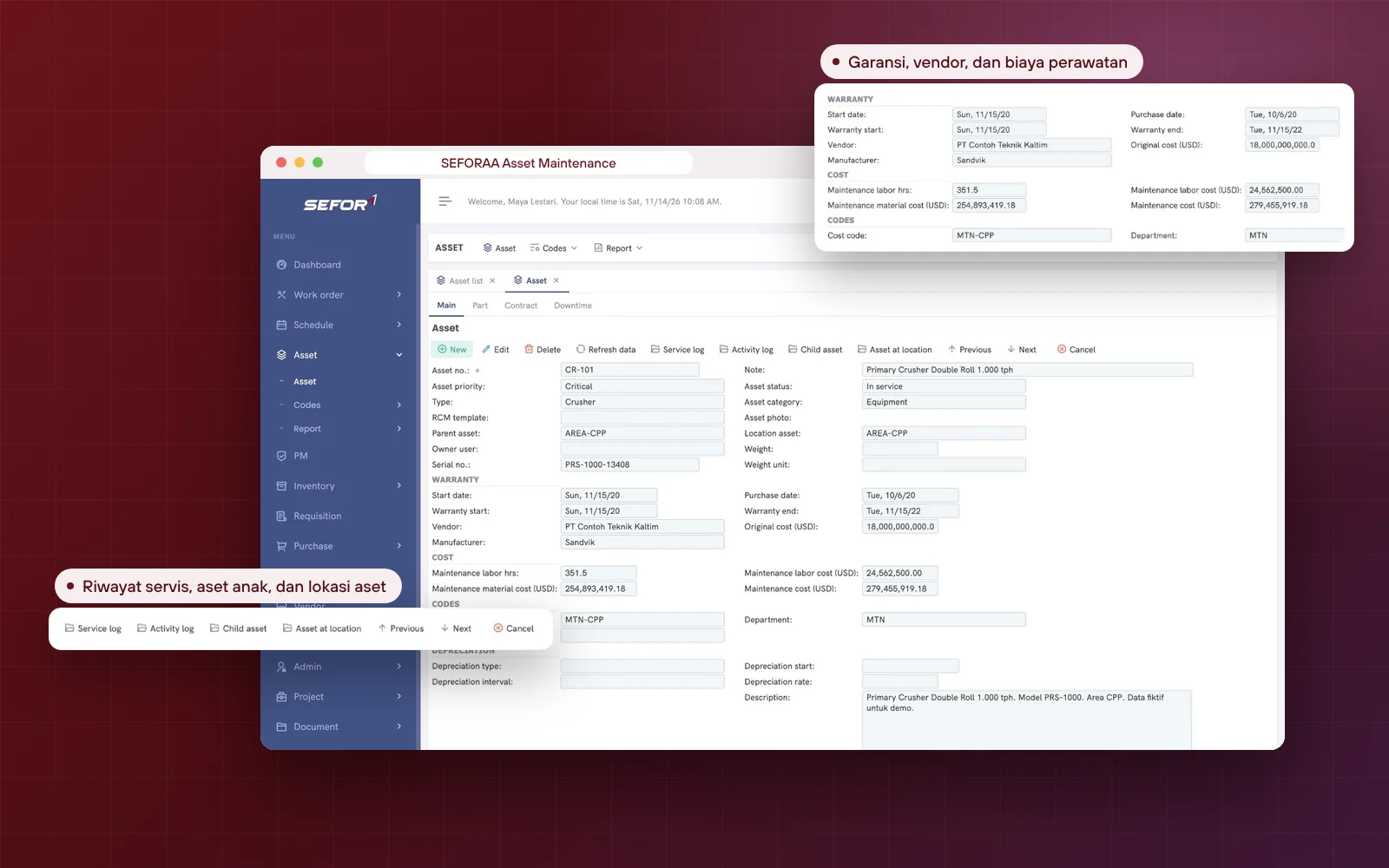
The asset page holds identity, warranty, cost and depreciation, complete with Part, Contract and Downtime tabs. From the same page you open service history, activity history, child assets and the assets at that location. In the mining demo, the primary crusher CR-101 shows its warranty and vendor, the working hours and maintenance cost accumulated so far, and its parent in the CPP area.

  1. Parent and child assets, plus asset location
  2. Serial number, owner, vendor, manufacturer and warranty
  3. Acquisition cost and depreciation
  4. Working hours, labor cost and maintenance material cost
  5. Service history and activity history
  6. Downtime per asset, complete with comments
  7. RCM templates on assets
Asset page of primary crusher CR-101 in SEFORAA Asset Maintenance: priority, type, parent asset, serial number, warranty, vendor, manufacturer, maintenance cost, Part, Contract and Downtime tabs, plus service history and activity history buttons

Work orders: queue

All maintenance work in view, from newly received to overdue

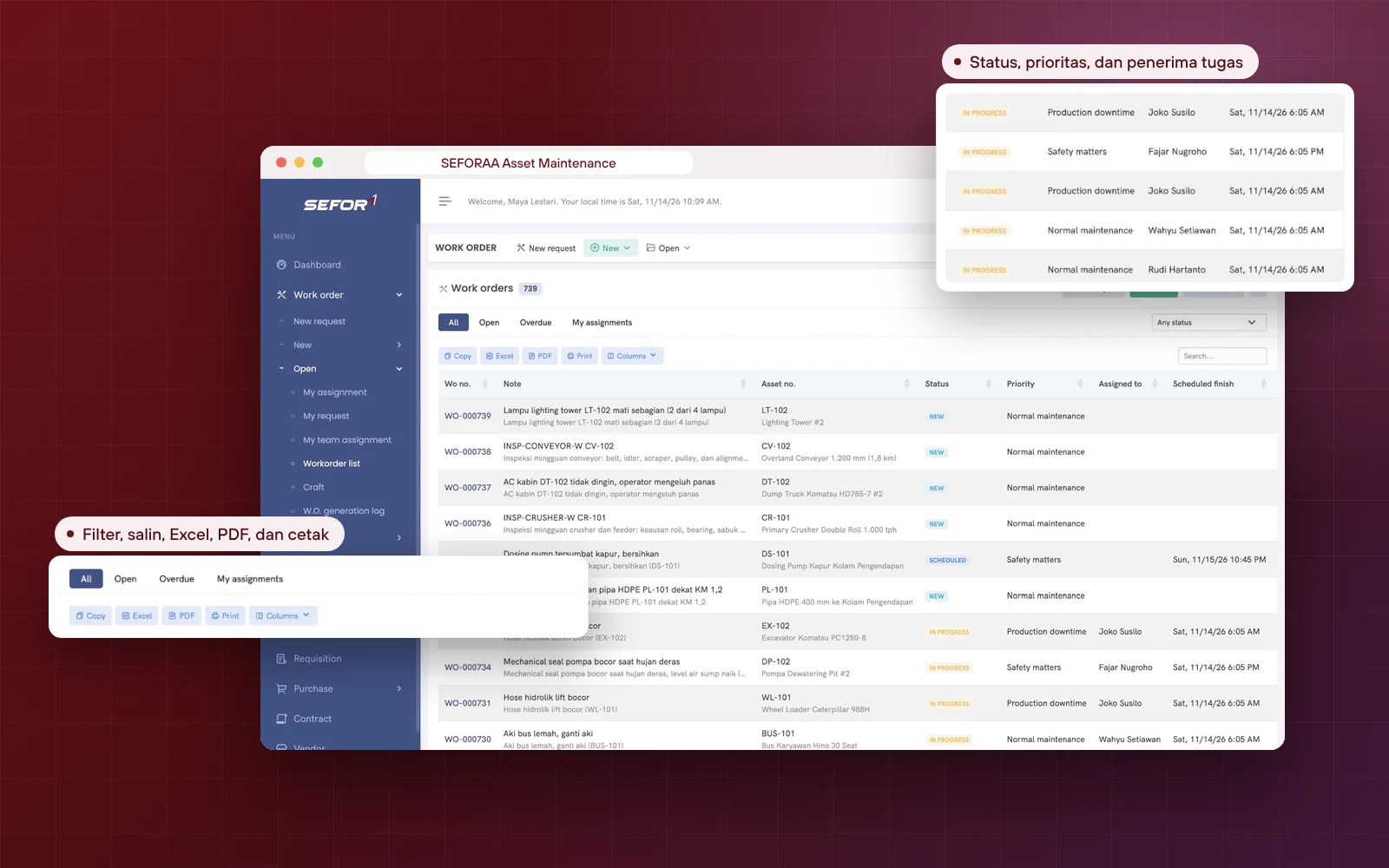
The work order list shows number, description, asset, status, priority, assignee and completion schedule. Filter by all, open, overdue or my assignments, then copy, export to Excel or PDF, or print. Priorities are separated into production downtime, safety matters and normal maintenance, so planners know which work is holding up production or concerns safety.

  1. Filters for all, open, overdue and my assignments
  2. Search by status
  3. Status from New, Scheduled and In progress through to Closed
  4. Copy, Excel, PDF and print
  5. Separate queues: my assignments, my requests and my team's assignments
Work order list in SEFORAA Asset Maintenance with 739 work orders: number, description, asset, status New, Scheduled, In progress and Open, production downtime and safety matters priority, assignee and completion schedule

Work orders: details

One work order records who, when, what and how long

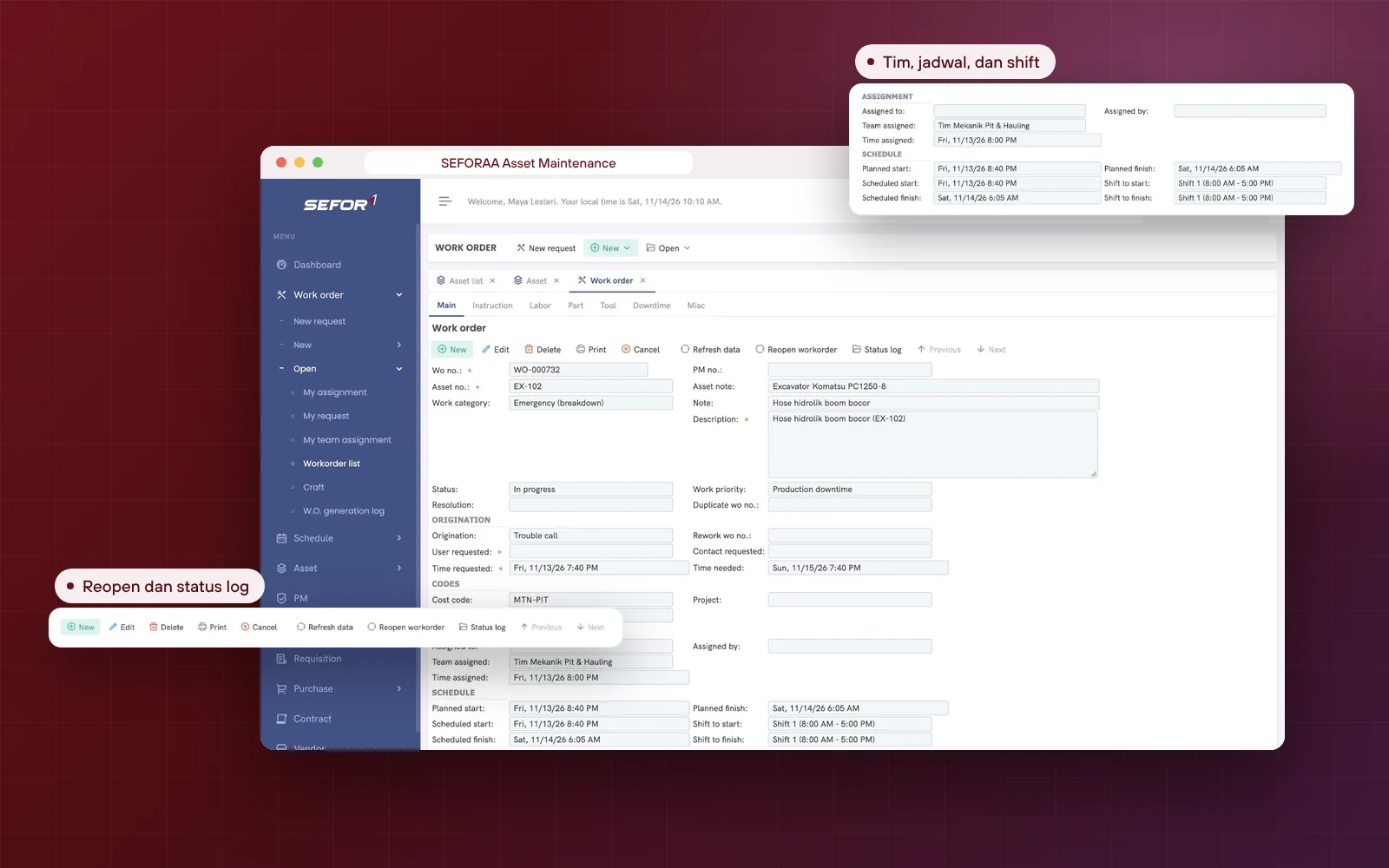
The work order form has the tabs Main, Instruction, Labor, Part, Tool, Downtime and Misc. It records the origin of the work (trouble call, PM, rework or other), work category, assignee or team, shift, planned and actual schedule, plus start and finish times. In WO-000732, a leaking hydraulic hose on the boom of excavator EX-102 is recorded as a trouble call with production downtime priority and is being worked on by the Pit & Hauling Mechanic Team on Shift 1. The status log records every change, and completed work orders can be reopened.

  1. Work origin: trouble call, PM, rework and others
  2. Assignment to people or teams, with shifts
  3. Planned schedule, actual schedule and actual times
  4. Instructions, labor, spare parts and tools
  5. Downtime and work cost
  6. Status log, Reopen and print
Work order form WO-000732 in SEFORAA Asset Maintenance: excavator EX-102 with a leaking hydraulic hose, status In progress, production downtime priority, trouble call origin, assigned team, shift, and planned and actual schedule, with Instruction, Labor, Part, Tool, Downtime and Misc tabs

Preventive maintenance (PM)

Scheduled preventive service by time or operating hours

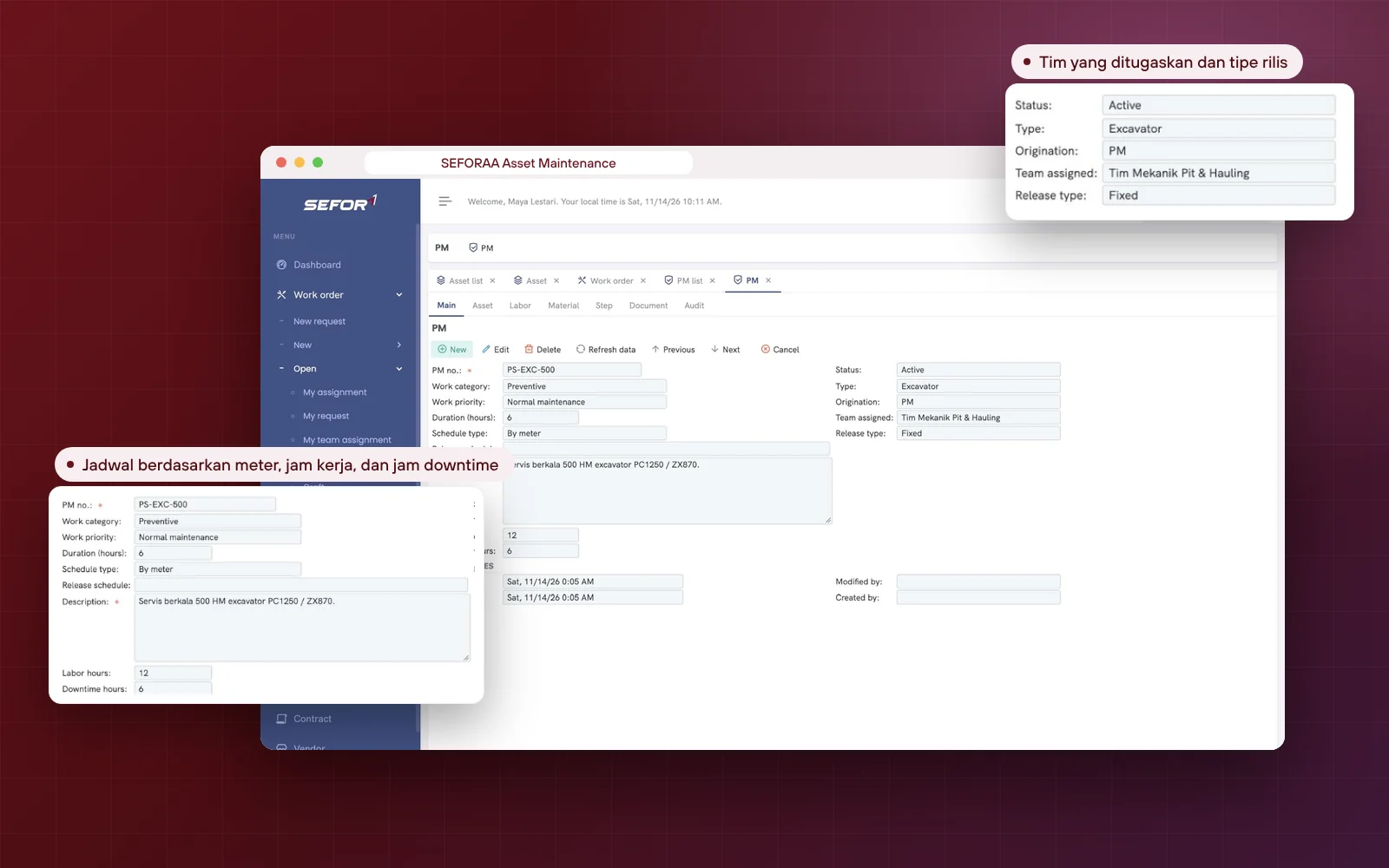
Every PM records work category, priority, duration, working hours, downtime hours, assigned team and schedule type. The schedule type can be time-based or meter-based, for example machine operating hours or ROV dive hours, so service falls due according to actual usage. PS-EXC-500 in the mining demo, for example, is the 500 HM preventive service of an excavator with a meter-based schedule, 12 working hours and 6 downtime hours. Work orders generated by a PM are recorded with PM as their origin, and their creation history is available in the W.O. generation log.

  1. Time-based or meter-based schedules
  2. Planned duration, working hours and downtime hours
  3. Assigned team
  4. Asset, labor, material, step, document and audit tabs
  5. Work orders from PM have PM as origin, with a W.O. generation log
Preventive maintenance page PS-EXC-500 in SEFORAA Asset Maintenance: 500 HM excavator preventive service with a meter-based schedule type, duration, working hours, downtime hours, assigned team, and Asset, Labor, Material, Step, Document and Audit tabs

Spare parts inventory

Spare parts available when needed, ordered before they run out

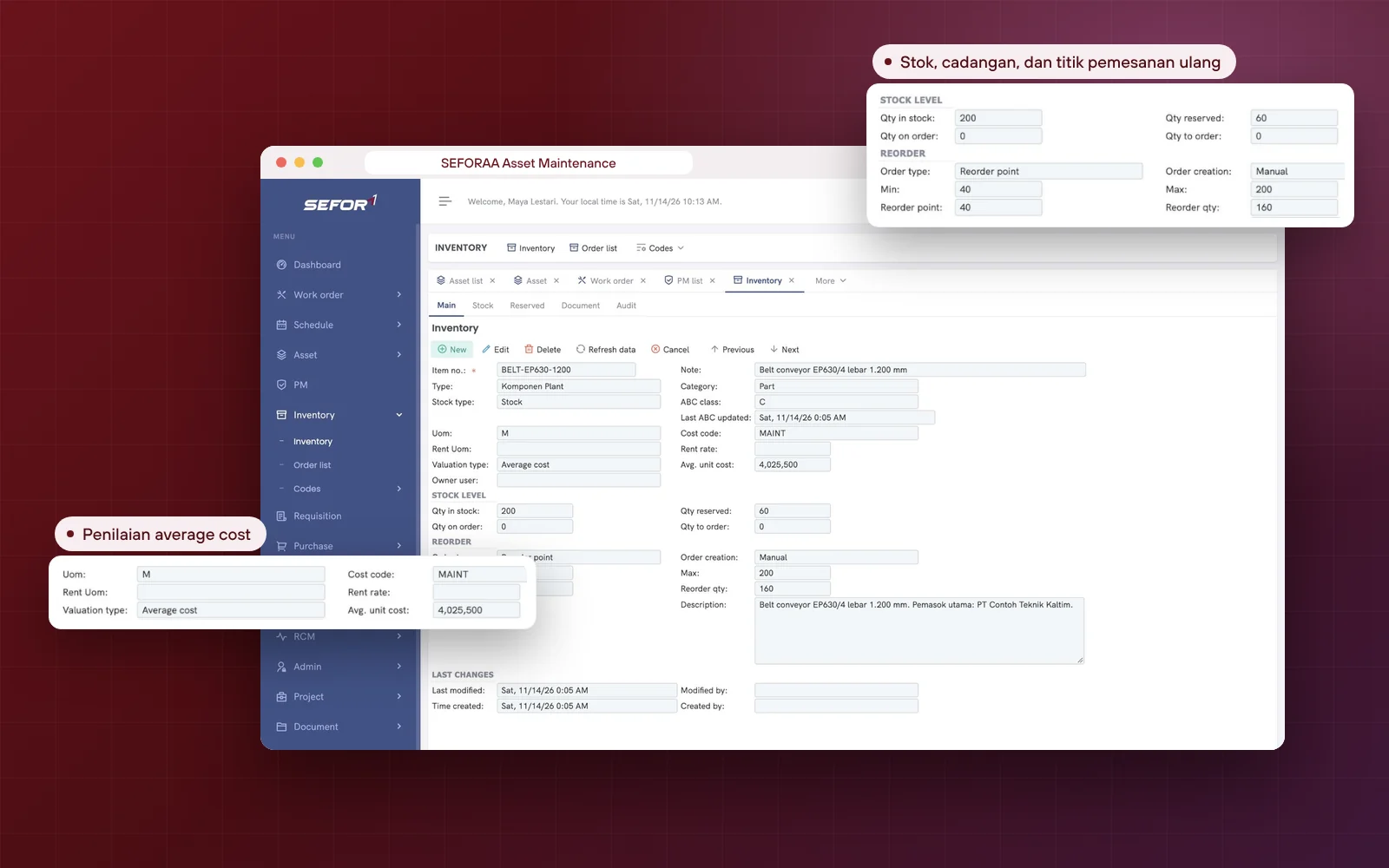
Every inventory item records the quantity in stock, the quantity already reserved for work orders, and the quantity on order. Reorder point, minimum and maximum stock, and reorder quantity help the warehouse team act before stock runs out. In the mining demo, conveyor belt BELT-EP630-1200 is recorded with 200 meters in stock, 60 meters reserved, a reorder point of 40, and the average cost per unit. Needs continue to a requisition and purchase order without moving data.

  1. Quantity in stock, reserved and on order
  2. Reorder point, minimum, maximum and reorder quantity
  3. ABC class and average cost valuation
  4. Stock location, inventory type and unit conversion
  5. Requisitions, purchase orders and vendors
Inventory item BELT-EP630-1200 in SEFORAA Asset Maintenance: conveyor belt with ABC class, average cost valuation method, quantity in stock, quantity reserved, reorder point, minimum and maximum stock, and reorder quantity

Inspections, training and projects

Maintenance does not stop at repairs: inspections, competence and projects are recorded too

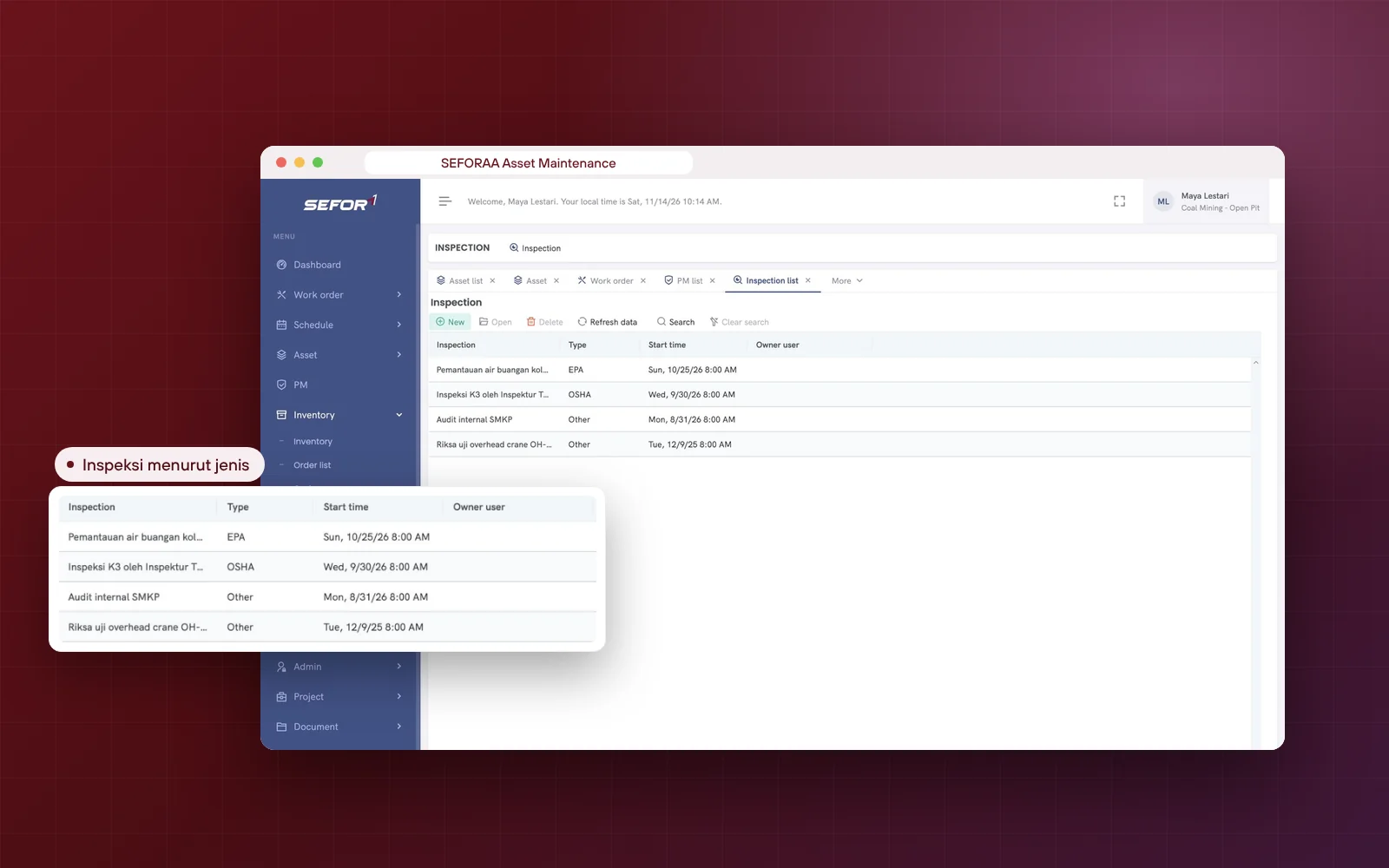
Inspections are recorded by type, for example EPA, OSHA or others, complete with start time and owner. In the mining demo, this list contains settling pond wastewater monitoring, occupational safety inspections, an internal SMKP audit and overhead crane inspection and testing. Training, courses and certificates are recorded in the Training menu, while overhauls or mobilizations are recorded as projects with a completion percentage.

  1. Inspections by type with start time and owner
  2. Training, courses and certificates
  3. Maintenance projects with completion percentage
  4. Budgets and cost codes
  5. Failures, functions and RCM templates
Inspection list in SEFORAA Asset Maintenance in the mining demo: settling pond wastewater monitoring of type EPA, occupational safety inspection of type OSHA, internal SMKP audit and overhead crane inspection and testing, with start times

Self-service demo

Try it yourself, with two different cases

Choose the case most similar to your company. Both are sample companies for the demo, with assets, maintenance schedules, hundreds of work orders, inventory and inspections already filled in, so you can trace the flow straight from the dashboard to the work order. Both demos use sample data and are for trying only.

How to try

  1. Fill in the form with your work emailPublic emails such as Gmail or Yahoo cannot be used.
  2. Receive the password by emailOur team sends the demo password to your work email.
  3. Log in following the User Guide (PDF)The address and username for login are written in the guide.

Demo data resets every 24 hours, so feel free to explore.

Request a demo password

Demo cases

Case 1

Coal Mining - Open Pit

An open-pit coal mine with a heavy equipment fleet, a coal processing plant (CPP), conveyors and dewatering pumps. Suited if your maintenance centers on unit operating hours, production downtime and mine safety.

Coal Mining - Open Pit demo dashboard: 739 work orders, a chart of work orders per month by origin, and the latest work order listPreventive maintenance PS-EXC-500 in the Coal Mining - Open Pit demo: 500 HM excavator service by meter
work orders
739
assets
64
open work orders
50

What you can trace

  1. Primary crusher CR-101, conveyors, HD785 dump truck, PC1250 excavator, wheel loader, generator set and dewatering pumps
  2. Preventive service by operating hours, for example excavator 500 HM, generator 500 hours and pump 500 hours
  3. Work order for a leaking hydraulic hose on excavator EX-102 with production downtime priority
  4. Conveyor belt, stock of 200 meters, with a reorder point of 40
  5. Occupational safety inspections, SMKP audit and overhead crane inspection and testing
Case 2

Subsea Contractor

An underwater contractor with ROVs, a USBL positioning system, diving bell, LARS, A-frame and support vessels. Suited if your equipment is maintained by dive hours, periodic calibration and inspections for classification.

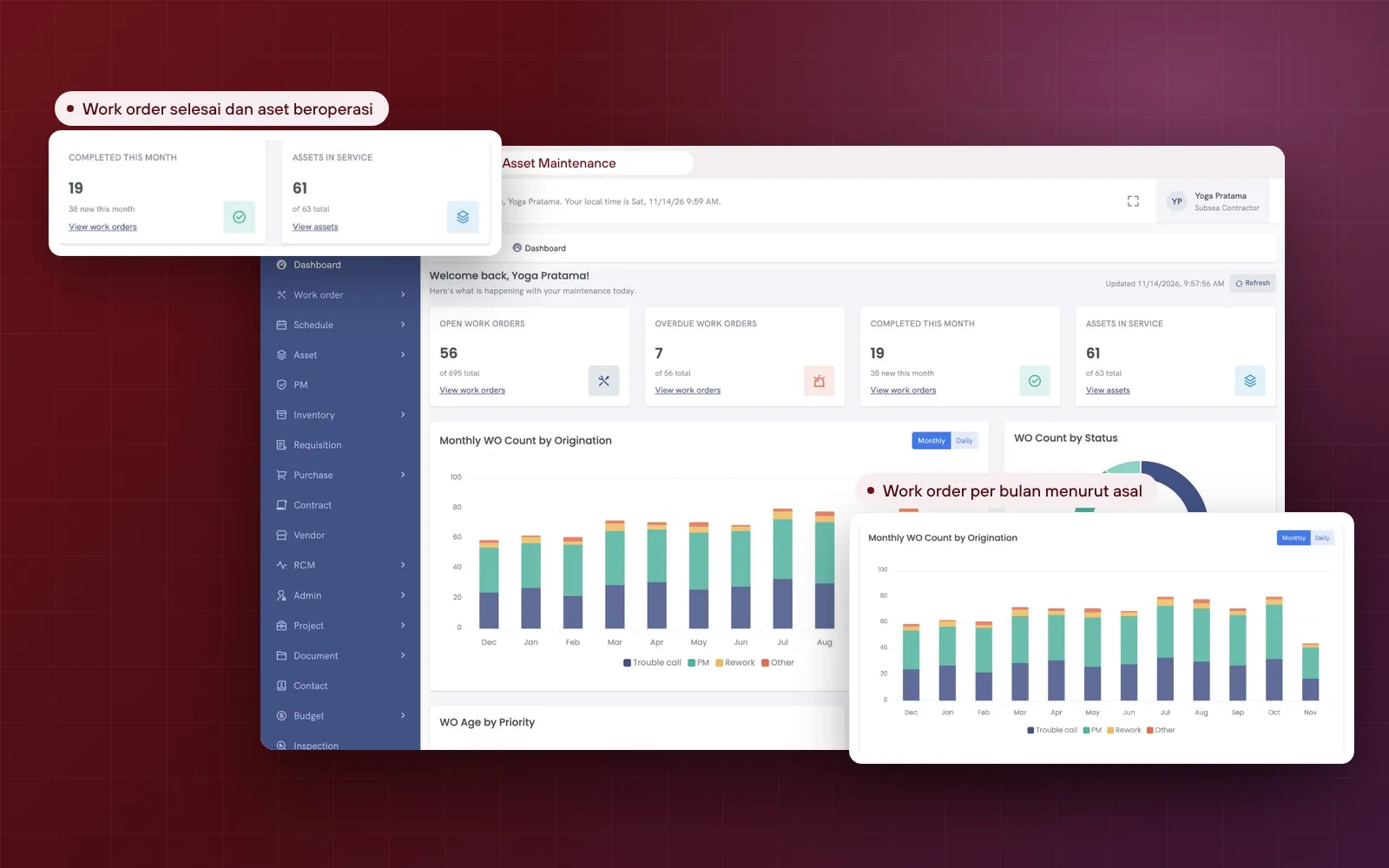
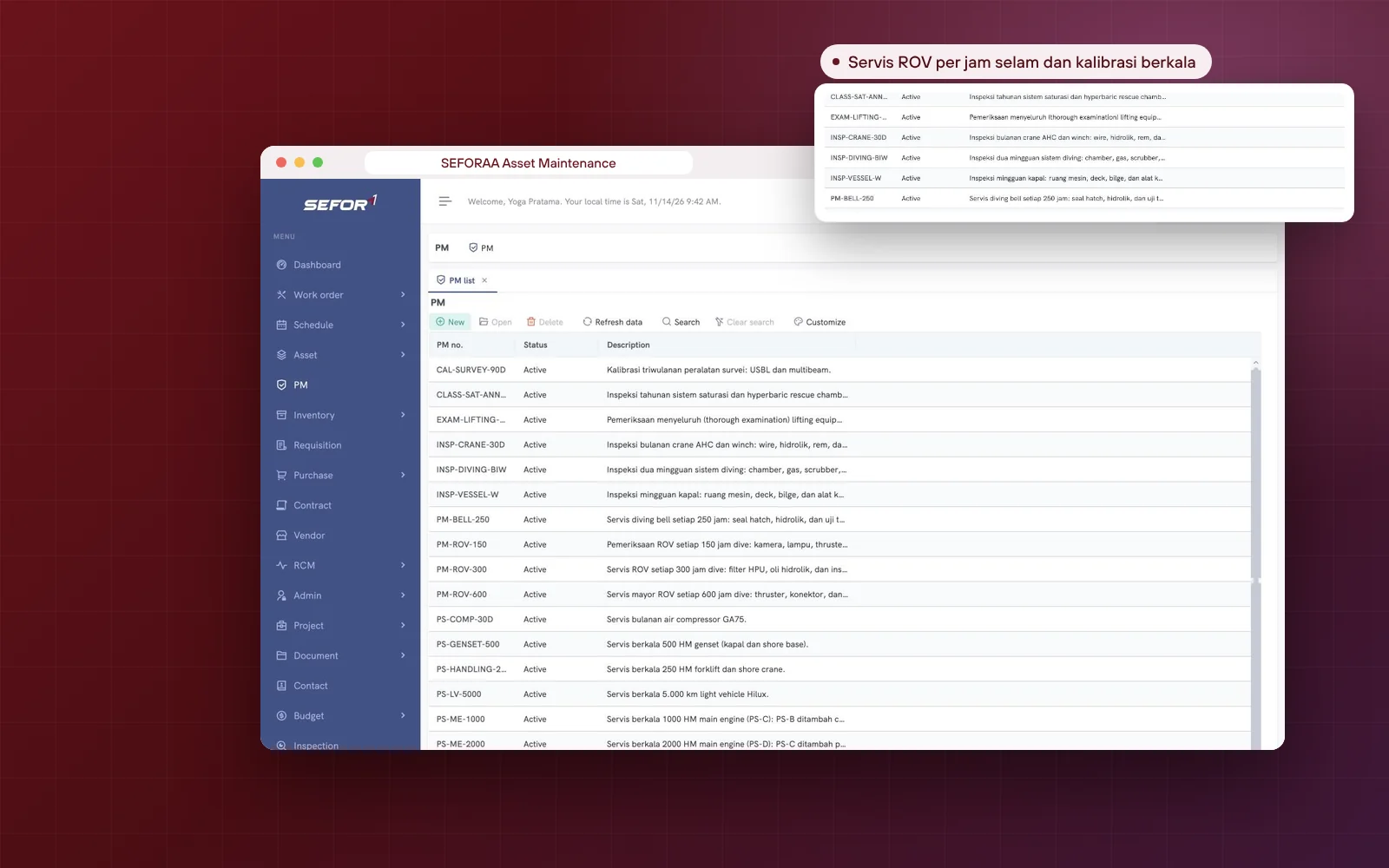
Subsea Contractor demo dashboard: 695 work orders, 61 of 63 assets in operation, and a chart of work orders per month by originPreventive maintenance list in the Subsea Contractor demo: ROV service every 150, 300 and 600 dive hours, survey calibration and dive system inspection
work orders
695
assets
63
open work orders
56

What you can trace

  1. ROV-101 and ROV-102, USBL-101, diving bell, LARS, 30-ton A-frame and the vessel's main engines
  2. ROV service every 150, 300 and 600 dive hours, plus diving bell service every 250 hours
  3. Survey calibration every 90 days, annual saturation system inspection for classification, and six-monthly lifting equipment inspection
  4. WO for USBL position drifting 2m during a survey & seal leak on manipulator ROV-102
  5. Biweekly dive system inspection and weekly vessel inspection
Prefer to be guided? Schedule a demo with the team that does this work every day, using scenarios close to your company's situation.

Capability matrix

SEFORAA Asset Maintenance capability details

A checklist for maintenance, planner, warehouse, IT and procurement teams evaluating CMMS and EAM software. Choose a group, or search for a specific capability.

Assets 12 capabilities

Asset list
Asset number, priority, type, status, category, parent asset and asset location
Asset data
Serial number, owner, vendor, manufacturer, warranty and acquisition cost
Asset cost
Working hours and labor cost, material cost, and maintenance cost accumulated from child assets
Depreciation
Type, start date, interval and depreciation rate
Parent and child assets
Multi-level asset structure, with shortcuts to child assets and assets at a location
History
Service history and activity history from the asset page
Downtime
Downtime recorded per asset with comments
Spare parts and contracts
Part and Contract tabs on the asset
Codes
Asset type, meter type and manufacturer are managed as codes
Photos and attachments
Asset photos and uploaded documents
RCM templates
RCM templates can be attached to assets
Reports
Asset list report

Work orders 12 capabilities

Work requests
New requests are submitted from the New request menu
Work origin
Trouble call, PM, rework and others
Status
New, Open, Scheduled, Wait for material, In progress, Completed, Reopen, Accepted and Closed
Priority
Production downtime, safety matters and normal maintenance
Assignment
Assigned to people or teams, with shifts
Schedule
Planned and actual schedule, start and finish times
Work details
Instruction, labor, parts, tools, downtime and other tabs
Status log
Every status change is recorded
Reopen
A completed work order can be reopened (Reopen)
Lists and filters
All, open, overdue and my assignments; search by status
Export and print
Copy, Excel, PDF and print from the list; the work order form can be printed
Craft
List of crafts (skills) for work performers

Preventive maintenance (PM) and schedules 6 capabilities

PM schedule
Time-based or meter-based, for example operating hours
PM content
Work category, priority, duration, working hours, downtime hours and assigned team
PM details
Asset, labor, material, step, document and audit tabs
Work order generation
Work orders from a PM are recorded with PM as origin; their history is in the W.O. generation log
User and team schedules
Schedules per user and per team, with shifts
Scheduler
Scheduler, Tasks and Job list in the Admin menu

Inventory, purchasing and costs 7 capabilities

Inventory items
ABC class, valuation method, category, unit and cost code
Stock levels
Quantity in stock, reserved and on order
Reorder
Reorder point, minimum, maximum and reorder quantity
Stock locations
Stock location, inventory type, unit and unit conversion
Requests and purchasing
Requisitions, purchase orders, PO list, tax codes and addresses
Vendors and contracts
Vendor and contract data
Budgets and cost codes
List of budgets and cost codes

Inspection, training, projects and RCM 6 capabilities

Inspection
Inspections by type (EPA, OSHA, others) with start time and owner
Training and certificates
Training, courses, course types and certificates
Maintenance projects
Projects and project types with completion percentage
RCM
Failures, functions and RCM templates
Documents
Uploaded files and document types
Contact
Contact list

Dashboard, settings and installation 10 capabilities

Dashboard
Open, overdue and completed work orders; assets in operation; charts of work orders per month or day, per status, and age by priority; latest work orders
Users and access
Users, groups, teams and departments
Customization
Data design, Table design and Dropdown design for data, tables and selection lists
Codes
Lists of codes that the administrator can manage
Interface language
English
Installation
Installed on your company's server under a perpetual license; not a SaaS subscription
Hosting
Hosting by SEFORAA is available as a separately charged service
Self-service demo
Two sample companies: Coal Mining - Open Pit and Subsea Contractor
Implementation
Asset mapping, configuration, data migration, training and go-live support
Custom development
Needs beyond standard settings can be developed by our team

Who it is for

For companies whose assets are costly when they stop

If one hour of a machine stopped means lost production or work schedule, maintenance needs to be planned, recorded and its cost traced. This application is built for the teams that handle this every day.

  1. Mining companies and mining contractorswith heavy equipment fleets, conveyors and processing plants
  2. Offshore and subsea contractorswith ROVs, dive systems, lifting equipment and vessels
  3. Plants and facility managerswith machines, generator sets, compressors and pumps
  4. Operators of vehicle and transport fleets
  5. Maintenance planners and supervisorswho schedule preventive maintenance
  6. Warehouse and procurement teamswho keep spare parts available

Settings and customization

Adapt it to your company's structure and way of working

The Admin menu provides settings for users, groups, teams, departments, codes and the scheduler, plus Data design, Table design and Dropdown design to adapt data, tables and selection lists. For more specific needs, our team can develop them.

What can be configured or developed

  • Users, groups, teams and departments
  • Asset types, meter types and manufacturers as codes
  • Stock location, inventory type, unit and unit conversion
  • Document types
  • Data design, Table design and Dropdown design
  • Scheduler and task lists in the Admin menu
  • Special reports or flows developed by our team

Installation

Choose the installation that suits you

Main option

Installed on your own server

SEFORAA Asset Maintenance is installed on your company's server. Asset data, maintenance history and inventory stay fully under company control.

Not a SaaS subscriptionAsset data and maintenance history stored on your own serverCan be adapted to company needs

No server yet?

Hosting by SEFORAA

No server yet? We offer hosting as a separately charged service, so your team can focus on using the application right away.

Discuss with us

Implementation

From asset mapping to the first work order.

Four steps we take together with your team, from the asset list to maintenance running in the application.

  1. Step 1

    Asset and structure mapping

    We study your asset list, locations and parent and child structure.

  2. Step 2

    Configuration and customization

    Asset types, codes, teams, departments, PM schedules and selection lists are set up as needed.

  3. Step 3

    Data migration and training

    Asset and inventory data is migrated, then planners, technicians and the warehouse are trained.

  4. Step 4

    Go-live and support

    Work orders and preventive maintenance run in SEFORAA Asset Maintenance, with support from our team.

Frequently asked questions

About SEFORAA Asset Maintenance

More questions? See the Pricing page or contact us.

What is SEFORAA Asset Maintenance?

SEFORAA Asset Maintenance is asset maintenance management software (CMMS and EAM). The application records assets with their history, schedules preventive maintenance, manages work orders from request to completion, records downtime, and manages spare parts, purchasing and maintenance costs. It is installed on your company's server, not a SaaS subscription.

What is the difference between CMMS and EAM?

A CMMS (computerized maintenance management system) focuses on maintenance work: work orders, preventive maintenance schedules and spare parts. An EAM (enterprise asset management) covers more broadly the whole asset life cycle, including purchase data, warranty, cost, depreciation, contracts and vendors. SEFORAA Asset Maintenance covers both in one application.

What information is recorded on an asset?

Every asset has an asset number, priority, type, parent asset and asset location, serial number, owner, vendor, manufacturer, plus warranty data and acquisition cost. Assets also store working hours and maintenance cost, material cost, cost code, department, depreciation data and photos. Service history and activity history can be opened from the asset page, as can child assets and the assets at a location. Downtime is recorded per asset, complete with comments.

How does a work order flow?

A work order can originate from a trouble call, a preventive maintenance (PM) schedule, rework or another source. Its status moves from New, Open, Scheduled, Wait for material, In progress and Completed, then Accepted and Closed; a work order can also be reopened (Reopen). Every status change is recorded in the Status log. Priorities can be separated into production downtime, safety matters and normal maintenance.

What can be recorded in one work order?

The work order form has the tabs Main, Instruction, Labor, Part, Tool, Downtime and Misc. It records the asset, work category, assignee or team, shift, planned and actual schedule, start and finish times, work instructions, labor, spare parts and tools used, downtime, and cost. The form can be printed.

Can maintenance schedules be based on operating hours, not just dates?

Yes. PM schedules can be time-based or meter-based, for example machine operating hours (HM) or ROV dive hours. Every PM records work category, priority, duration, working hours, downtime hours and the assigned team, along with asset, labor, material, step and document tabs. Work orders from a PM are recorded with PM as their origin, and their creation history can be seen in the W.O. generation log.

How do spare parts connect to work orders?

Inventory items are recorded with quantity in stock, quantity reserved and quantity on order, complete with a reorder point, minimum and maximum stock, and reorder quantity. Work orders have a Part tab for the spare parts used. ABC class, valuation method (for example average cost), stock location and unit conversion are also available. Item needs can continue to a purchase requisition and purchase order.

Does this application manage purchasing and vendors?

Yes. The application provides the Requisition, Purchase (my POs, open POs, PO list, tax codes and addresses), Vendor and Contract menus, so ordering of spare parts and services is recorded together with the assets and work orders that need them.

Is there a work schedule for technicians and teams?

Yes. The Schedule menu provides schedules per user and per team, including shifts. Work orders can be assigned to people or teams, and the Open page shows my assignments, my requests and my team's assignments.

Is there a dashboard to monitor maintenance work?

Yes. The dashboard shows the number of open, overdue and completed-this-month work orders and assets in operation, the number of work orders per month or per day by work origin, the number of work orders per status, work order age by priority, plus a list of the latest work orders.

Can the work order list be filtered and exported?

Yes. The work order list can be filtered into all, open, overdue and my assignments, and searched by status. The list can be copied, exported to Excel or PDF, and printed.

Does the application also manage inspections, training and maintenance projects?

Yes. The Inspection menu records inspections by type, for example EPA, OSHA or others. The Training menu records training, courses and certificates. The Project menu records maintenance projects, such as overhauls or mobilizations, with a completion percentage. The Budget menu records budgets and cost codes, and the RCM menu records failures, functions and RCM templates that can be attached to assets.

What language is the application interface in?

The application interface is available in English. Data you record, such as asset names, work order descriptions and work instructions, can be written in any language, as in both demos.

Can the application be adapted to our company's needs?

Yes. The Admin menu provides settings for users, groups, teams, departments, codes and the scheduler, plus Data design, Table design and Dropdown design to adapt data, tables and selection lists. More specific needs can be developed by our team.

Is SEFORAA Asset Maintenance subscription-based (SaaS)?

No. The application is installed on your company's server under a perpetual license; modifications, fixes and maintenance are available through SEFORAA's paid annual support service. If you do not have a server yet, SEFORAA hosting is available as a separately charged service.

How can I try the application?

A self-service demo is available with two sample companies: Coal Mining - Open Pit (open-pit mining) and Subsea Contractor (underwater contractor). Each contains assets, maintenance schedules, hundreds of work orders, inventory and inspections. Fill in the form in the Self-service demo section with your work email (not a public email), and we send the demo password to that email. Login instructions are in the User Guide (PDF) for each case. Demo data resets every 24 hours.

RaaS Result as a Service

No software to buy. Just receive the results.

Not ready to use software to manage asset maintenance? Through Result as a Service, the PT Tilyanpristka team can help turn asset and maintenance data into the reports you need, without buying software. Contact us to discuss the scope of service that suits your company.

Learn about RaaS (opens in a new tab)

PT Tilyanpristka services since 2004