
Hello, we are SEFORAA.

Contact us to ask about the applications, request a quotation, or schedule a demo. Our team is ready to help during business hours.

Schedule a demo

Follow us

SEFORAA Payroll: payroll software for companies and payroll consultants

Calculate salary, PPh 21 and BPJS, then send withholding slips to Coretax, all in one payroll software installed on your server under a perpetual license.

Payroll software from practitioners

Used every month to process payroll for thousands of employees

SEFORAA Payroll is developed by PT Tilyanpristka and is the backbone of its payroll BPO service. Every month, the application is used to process payroll for thousands of employees from many companies, each with different salary structures and policies.

That experience is what makes SEFORAA Payroll ready for mid-sized and large companies, as well as payroll consultants serving many clients.

  • PPh 21 under the TER scheme and BPJS calculated automatically
  • Withholding slip sent to Coretax through a PJAP (separate monthly fee)
  • Multiple companies in one installation
  • Automatic payroll automatically to SEFORAA Accounting
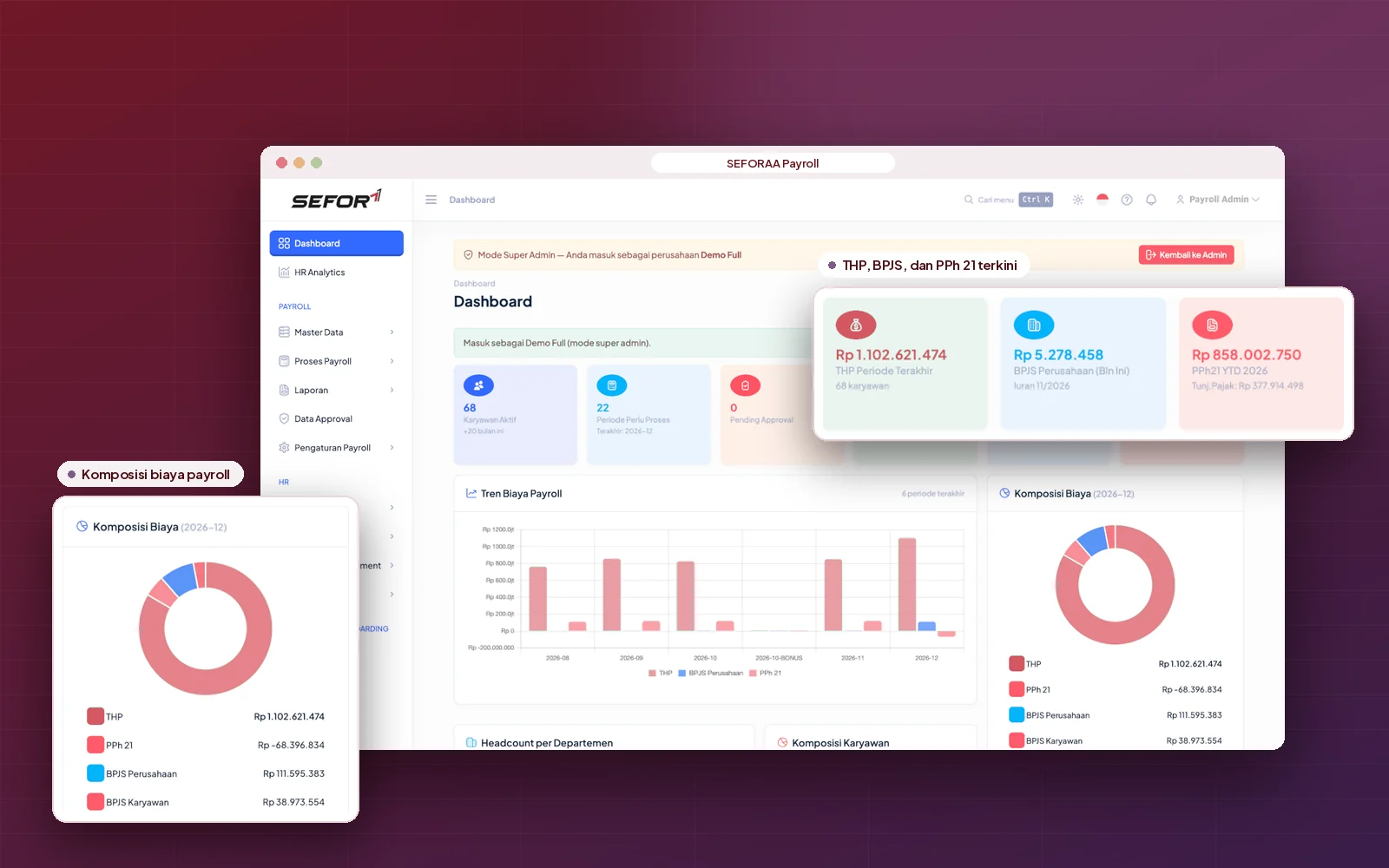
SEFORAA Payroll dashboard

Why SEFORAA Payroll

Four reasons to choose SEFORAA Payroll

  • Proven at thousands of employees

    Used every month to process payroll for thousands of employees from many companies.

    PT Tilyanpristka BPO service
  • Fast customization

    Born from the varied payroll cases of clients, so adapting it to your company is faster.

    Pay componentsFormulaReports
  • Connected to Coretax

    PPh 21/26 withholding slips are sent to Coretax through an official PJAP (separate monthly fee).

    PPh 21/26PJAP: separate monthly fee
  • Yours, not rented

    Installed on your server under a perpetual license, not a SaaS subscription.

    Perpetual licenseYour server

SEFORAA Payroll features

Complete features for the whole payroll process

Filter by group to see the features most relevant to your team.

  • Employee data for payroll

    PTKP (non-taxable income) status, NPWP/NIK, bank account, and employment status: permanent, contract, daily, up to expatriate.

    Salary calculation
  • Salary components and formulas

    Fixed and variable allowances and deductions, with formulas that can be adapted to company policy.

    Salary calculation
  • Automatic salary calculation

    All salary components are calculated automatically, including daily pay and proration for new hires, leavers and transfers.

    Salary calculation
  • Overtime, THR and bonuses

    Overtime per labor regulations, THR (religious holiday allowance) based on length of service, plus bonuses, incentives and commissions.

    Salary calculation
  • PPh 21 and PPh 26

    TER scheme per PP 58/2023, gross, gross-up and net methods, through to year-end tax calculation.

    Tax & BPJS
  • BPJS Health and Employment

    JHT, JKK, JKM, JP and BPJS Health contributions by wage base and caps, complete with reports.

    Tax & BPJS
  • Withholding slips to Coretax

    PPh 21/26 withholding slips are generated from payroll results and sent to Coretax through a PJAP (separate monthly fee).

    Tax & BPJS
  • Loans and cash advances

    Installment deductions applied automatically each period, with the loan balance always updated.

    Salary calculation
  • Cycles and currencies

    Monthly, weekly, daily or custom payroll, including multi-currency payroll for expatriates.

    Salary calculation
  • Multiple companies and branches

    Many companies, branches, withholding NPWPs and BPJS registration numbers in one installation.

    Output & control
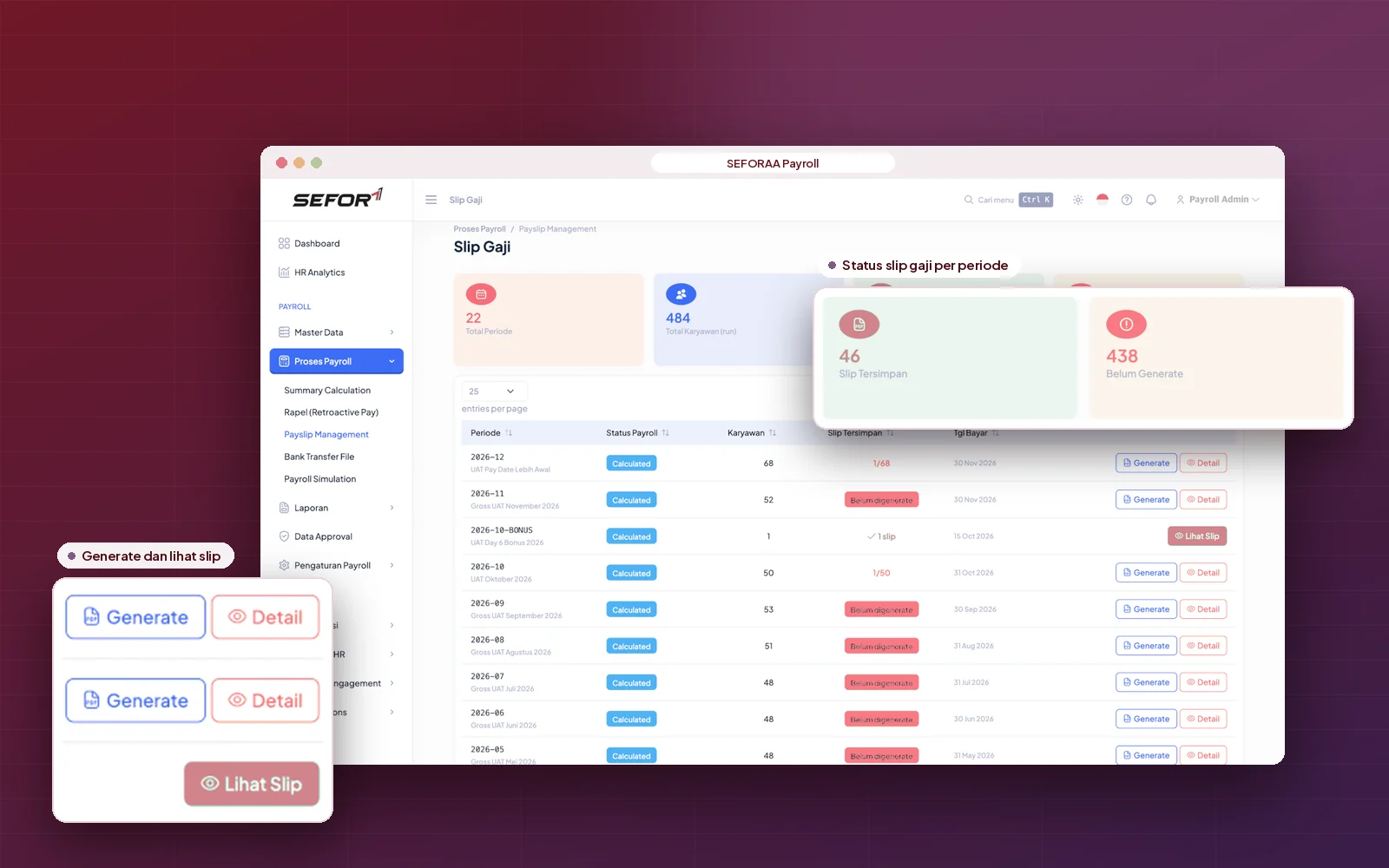
  • Payslips

    PDF payslips that can be printed or emailed to employees with password protection.

    Output & control
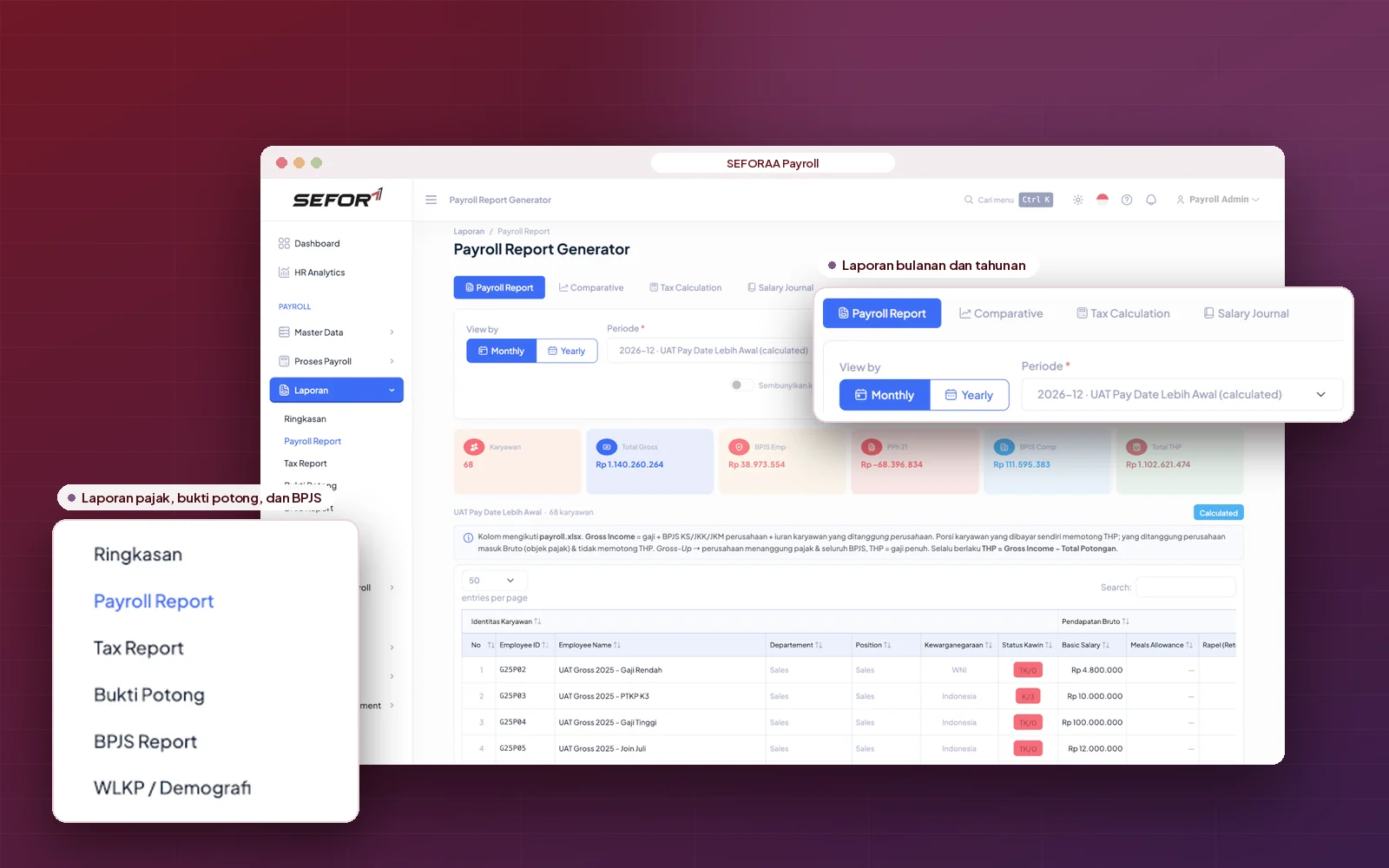
  • Payroll reports and journals

    Recaps by period, branch or department, Excel export, plus automatic payroll journals to SEFORAA Accounting.

    Output & control
  • Access rights, approvals and audit

    Role-based access, approval before payroll is finalized, and an audit trail of every data change.

    Output & control

Need a feature that is not listed?

Discuss your needs

Closer look

From calculation to the payslip in the employee's hands.

Salary calculation

Consistent payroll calculation every period

Configure once, and every salary component is calculated with the same rules each period, for employees with different statuses and work patterns.

  1. Basic salary, allowances and deductions per company formulas
  2. Automatic daily pay and proration
  3. Overtime and late arrivals per applicable rules
  4. THR, bonuses, incentives and commissions
  5. Severance, separation pay and pension fund (DPLK) contributions
  6. Loan or cash advance deductions with automatic balances
  7. Calculation corrections per employee or in bulk
  8. Back pay or retroactive salary differences
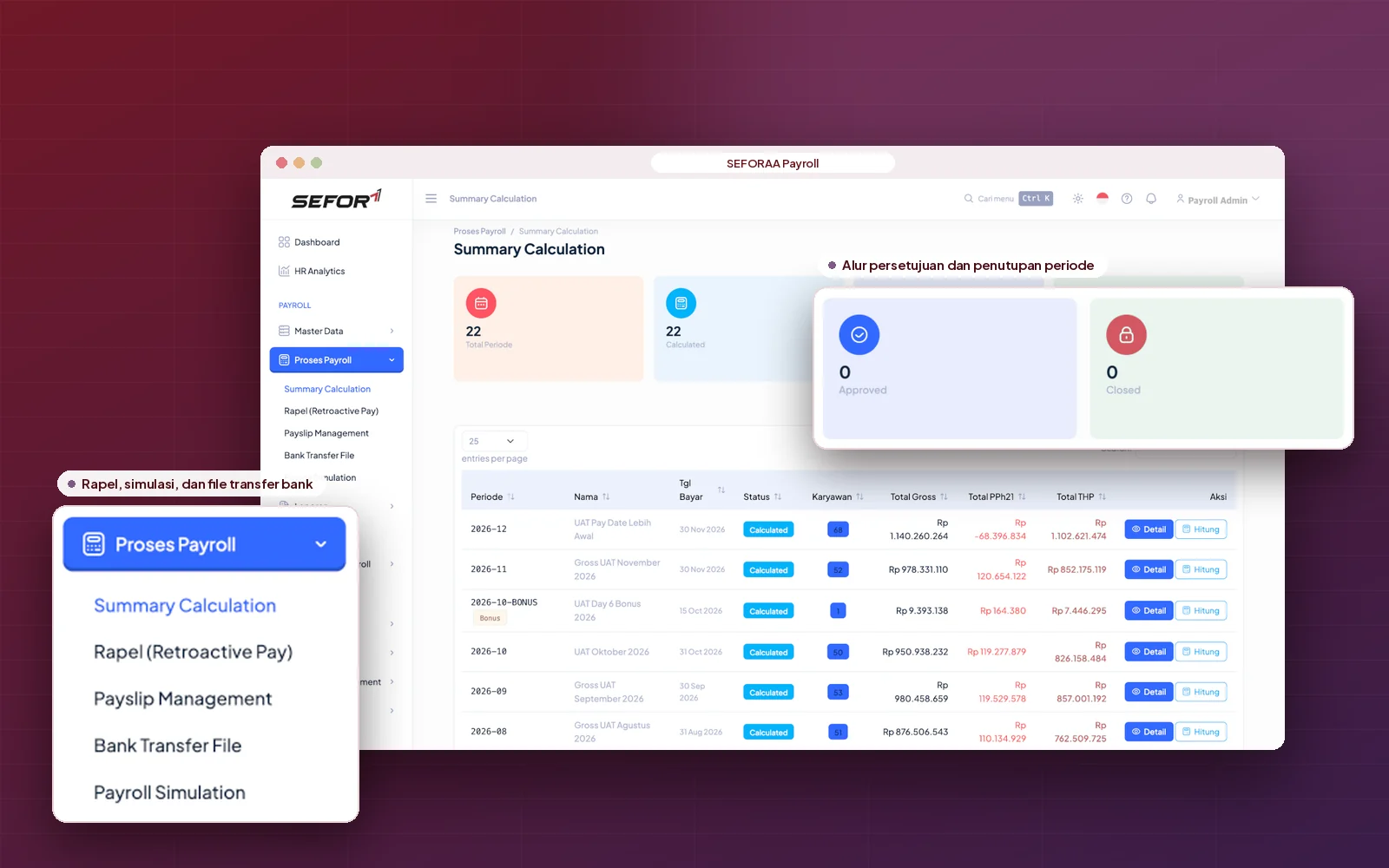
Payroll calculation process in SEFORAA Payroll

PPh 21 and BPJS

PPh 21 and BPJS per the latest regulations

Tax and BPJS calculations follow applicable regulations, developed by a team that handles clients' payroll and tax compliance every month.

  1. PPh 21 under the TER scheme per PP 58/2023
  2. Gross, gross-up, net or mixed methods
  3. PPh 26 for expatriates and foreign taxpayers
  4. PPh 21 for non-employees: commissioners, experts and former employees
  5. Tax calculation corrections
  6. PPh calculation details per employee
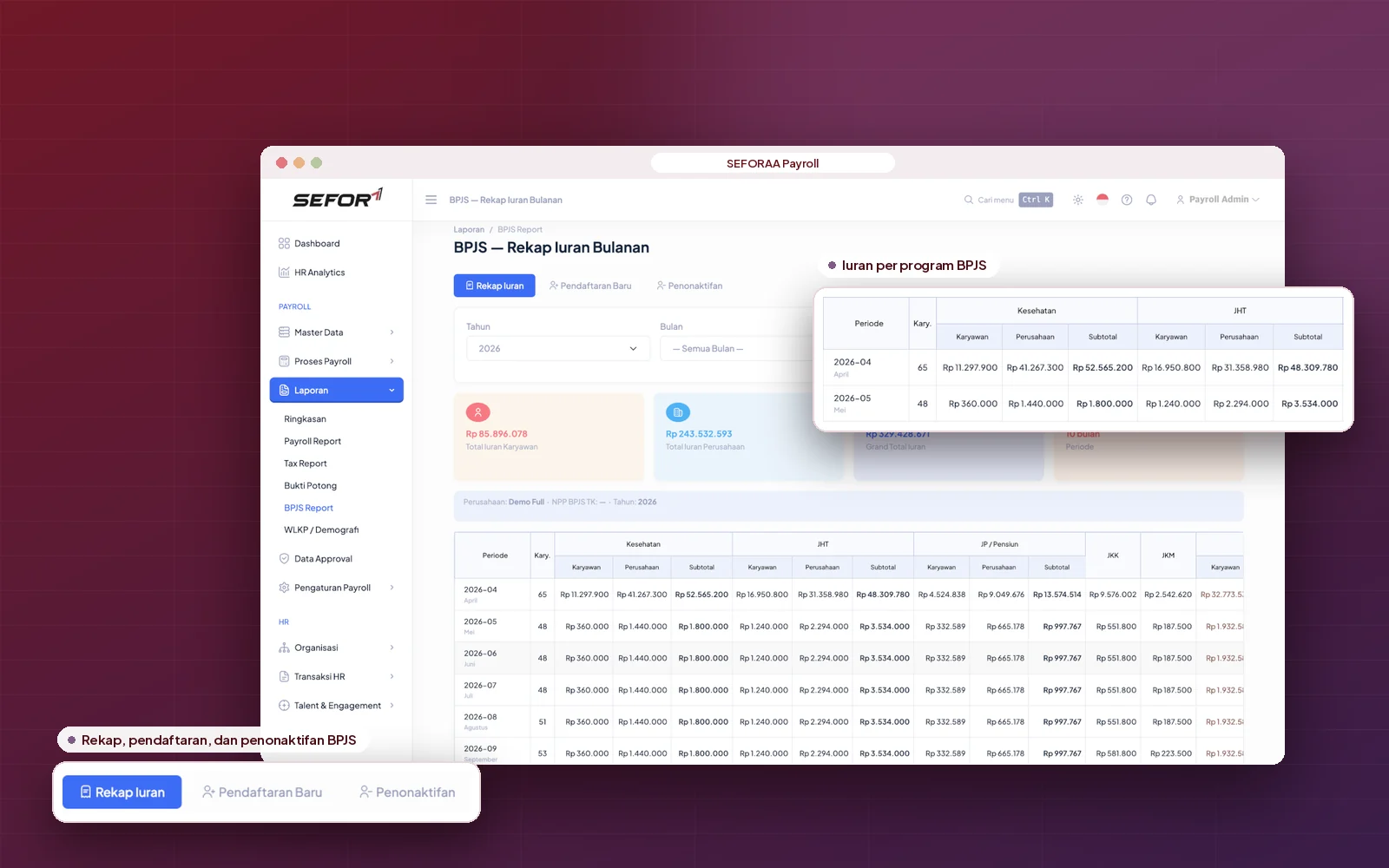
  7. BPJS Health and BPJS Employment contributions (JHT, JKK, JKM, JP)
  8. BPJS reports in SIPP and Edabu formats
PPh 21 and BPJS calculation in SEFORAA Payroll

Coretax and reporting

Withholding slips sent to Coretax through a PJAP (separate monthly fee)

SEFORAA Payroll connects to Coretax through the API of a PJAP (tax application service provider, separate monthly fee). Withholding slips are generated directly from payroll results, so nothing needs to be retyped.

  1. Monthly withholding slips for permanent employees
  2. Final and non-final PPh 21 withholding slips
  3. PPh 26 withholding slips
  4. Annual Form 1721-A1, including for leavers
  5. Monthly PPh 21/26 tax return (SPT Masa) data
PPh 21 withholding slip and Coretax connection in SEFORAA Payroll

Payslips and payment

Payslips, transfer files and secure controls

Once the calculation is approved, payslips and payment files are available right away, with access limited by each user's role.

  1. PDF payslips: print or password-protected email
  2. Bank salary transfer files: multiple accounts, split and hold
  3. Direct salary payment (disbursement)
  4. Payroll approval before finalization
  5. Role-based access and audit trail
  6. Multi-factor authentication
  7. Tax and BPJS deadline reminders
Payslip and transfer file in SEFORAA Payroll

For payroll consultants

Manage payroll for many clients in one application

SEFORAA Payroll was born in a payroll BPO company that processes salaries for many companies every month. Payroll consultants get the same way of working: many clients in one installation, with data kept separate and secure.

  1. Separate data and access rightsfor every client
  2. Multiple withholding NPWPs and BPJS numbersper client
  3. Different salary componentsfor every client
  4. Bulk payroll processingfor many companies
  5. Reports and withholding slipsper client

Customization and integration

A unique payroll policy? Customization is fast

Every company has its own pay rules. Because it is used to serve varied clients with different payroll cases, SEFORAA Payroll is used to being adapted, so customization for your company can be done faster.

Can be adapted or developed together with our team

  • Import attendance and overtime data from machines or other systems
  • HRIS integration through data import or API
  • Employee portal to view payslips
  • Reimbursement payments through payroll
  • Unpaid leave and attendance deductions
  • Employee benefit programs

Installation

Choose the installation that suits you

Main option

Installed on your own server

SEFORAA Payroll is installed on your company's server under a perpetual license. Employee salary data stays fully under company control.

Perpetual license, not a monthly rentalNot a SaaS subscriptionPayroll data stored on your own server

No server yet?

Hosting by SEFORAA

No server yet? We offer hosting as a separately charged service, so your payroll team can focus on using the application right away.

Discuss with us

Implementation

From analysis to payroll running.

Four steps we take together with your team, with results compared against the old process before go-live.

  1. Step 1

    Payroll policy analysis

    We study your salary components, overtime rules and tax policies.

  2. Step 2

    Configuration and customization

    Components, formulas and reports are adapted, including your company's special needs.

  3. Step 3

    Data migration and parallel run

    Employee data and opening balances are moved, then results are compared with the old process.

  4. Step 4

    Go-live and support

    Payroll runs in SEFORAA Payroll, with support from our team.

Self-service demo On Progress

Try SEFORAA Payroll yourself, with sample company data.

Request a password with your work email, then trace payroll from salary components to withholding slips, any time without waiting for a schedule.

How to try

  1. Fill in the form with your work emailPublic emails such as Gmail or Yahoo cannot be used.
  2. Receive the password by emailOur team sends the demo password to your work email.
  3. Log in following the User Guide (PDF)The address and username for login are written in the guide.

Demo data resets every 24 hours, so feel free to explore.

On Progress

The SEFORAA Payroll self-service demo is being prepared.

The password request form will open here together with the User Guide (PDF). In the meantime, our team is ready to show the application live.

Schedule a demo with our team
Prefer to be guided? Schedule a demo with the team that does this work every day, using scenarios close to your company's situation.

Frequently asked questions

About SEFORAA Payroll

More questions? See the Pricing page or contact us.

What is SEFORAA Payroll?

SEFORAA Payroll is payroll software for calculating salary, PPh 21/26 and BPJS contributions, issuing payslips, and sending withholding slips to Coretax through a PJAP (separate monthly fee). It is developed by PT Tilyanpristka and marketed by PT SEIA FORTUNA ABADI INTEGRA for mid-sized companies, large companies and payroll consultants.

What is the difference between payroll software and an HRIS?

Payroll software focuses on calculating and paying salaries, tax, BPJS, payslips and their reporting. An HRIS covers broader HR management, such as recruitment, attendance, leave and performance appraisal. SEFORAA Payroll focuses on payroll and can sit alongside the HRIS you already use.

Is SEFORAA Payroll subscription-based (SaaS)?

No. SEFORAA Payroll is installed on your company's server under a perpetual license; modifications, fixes and maintenance are available through SEFORAA's paid annual support service. If your company does not have a server yet, SEFORAA hosting is available as a separately charged service.

Can SEFORAA Payroll process payroll for thousands of employees?

Yes. The same application is used by PT Tilyanpristka in its payroll BPO service to process payroll for thousands of employees from many companies every month.

Can a payroll consultant manage many client companies in one application?

Yes. One SEFORAA Payroll installation can manage many client companies, with separate data and access rights for each client. For companies that are not payroll consultants, SEFORAA Payroll is provided for a single company.

Does the PPh 21 calculation follow the latest TER scheme?

Yes. PPh 21 is calculated using the average effective rate (TER) under PP 58/2023, including recalculation at the end of the tax year.

Does it support the gross, net and gross-up PPh 21 methods?

Yes. The withholding method can be set per company policy: gross, gross-up, net or mixed.

How does SEFORAA Payroll calculate BPJS Health and BPJS Employment contributions?

BPJS Health and BPJS Employment contributions (JHT, JKK, JKM and JP) are calculated automatically from the applicable wage base and caps, for both the company share and the employee share.

Can it calculate THR, bonuses, overtime and prorated salary?

Yes. THR (religious holiday allowance) is calculated by length of service, overtime follows labor regulations, and prorated pay is calculated automatically for employees who join, leave or transfer mid-period. Bonuses and incentives are processed together with their tax.

Does SEFORAA Payroll connect to Coretax for PPh 21 withholding slips?

Yes. SEFORAA Payroll connects to Coretax through the API of a PJAP (tax application service provider, separate monthly fee), so PPh 21/26 withholding slips are generated directly from payroll results without re-entry.

Is there a monthly fee for the Coretax connection?

Yes. The Coretax connection uses a PJAP (tax application service provider) service that is charged as a separate monthly fee. The SEFORAA license itself is perpetual with no subscription fee; other recurring fees apply only to annual support and to hosting by SEFORAA if you choose it.

How are payslips shared with employees?

Payslips are available as PDFs that can be printed or emailed to employees with password protection.

Can SEFORAA Payroll be customized to company policy, and how fast?

Yes, and fast. SEFORAA Payroll is used by PT Tilyanpristka to serve many clients with different payroll cases, so adjustments to salary components, calculation rules or special reports can be done faster.

Can SEFORAA Payroll connect to the HRIS or attendance system we already use?

It can be developed. SEFORAA Payroll can receive data from an HRIS or other attendance systems through data import or API, adapted to the system you use.

Can payroll results become journals in accounting software directly?

Yes. Payroll results from SEFORAA Payroll automatically become payroll journals in SEFORAA Accounting.

How is employee salary data kept secure?

Access is limited by user role and every data change is recorded in an audit trail. Because the application is installed on your company's server, salary data stays under the company's internal control.

Does SEFORAA provide payroll outsourcing?

No. SEFORAA sells payroll software. Payroll outsourcing, meaning payroll handled entirely by an outside party, is provided by PT Tilyanpristka without the need to buy software.

RaaS Result as a Service

No software to buy. Just receive the results.

Through Result as a Service, the PT Tilyanpristka BPO team calculates salary, PPh 21 and BPJS, issues payslips, and prepares withholding slips for your company. You simply receive the results, without buying payroll software and without building your own payroll team.

Learn about RaaS (opens in a new tab)

PT Tilyanpristka services since 2004