SEFORAA Auditor Timesheet: timesheet and audit engagement management software for public accounting firms
Manage job orders, hour budgets per position, auditor timesheets, overtime and multi-level approval in one application installed on your firm's server under a perpetual license.
SEFORAA Auditor Timesheet is developed by PT Tilyanpristka specifically for the workflow of public accounting firms (KAP): from job orders and client risk assessment, hour budgets per auditor level, to daily timesheets and partner approval.
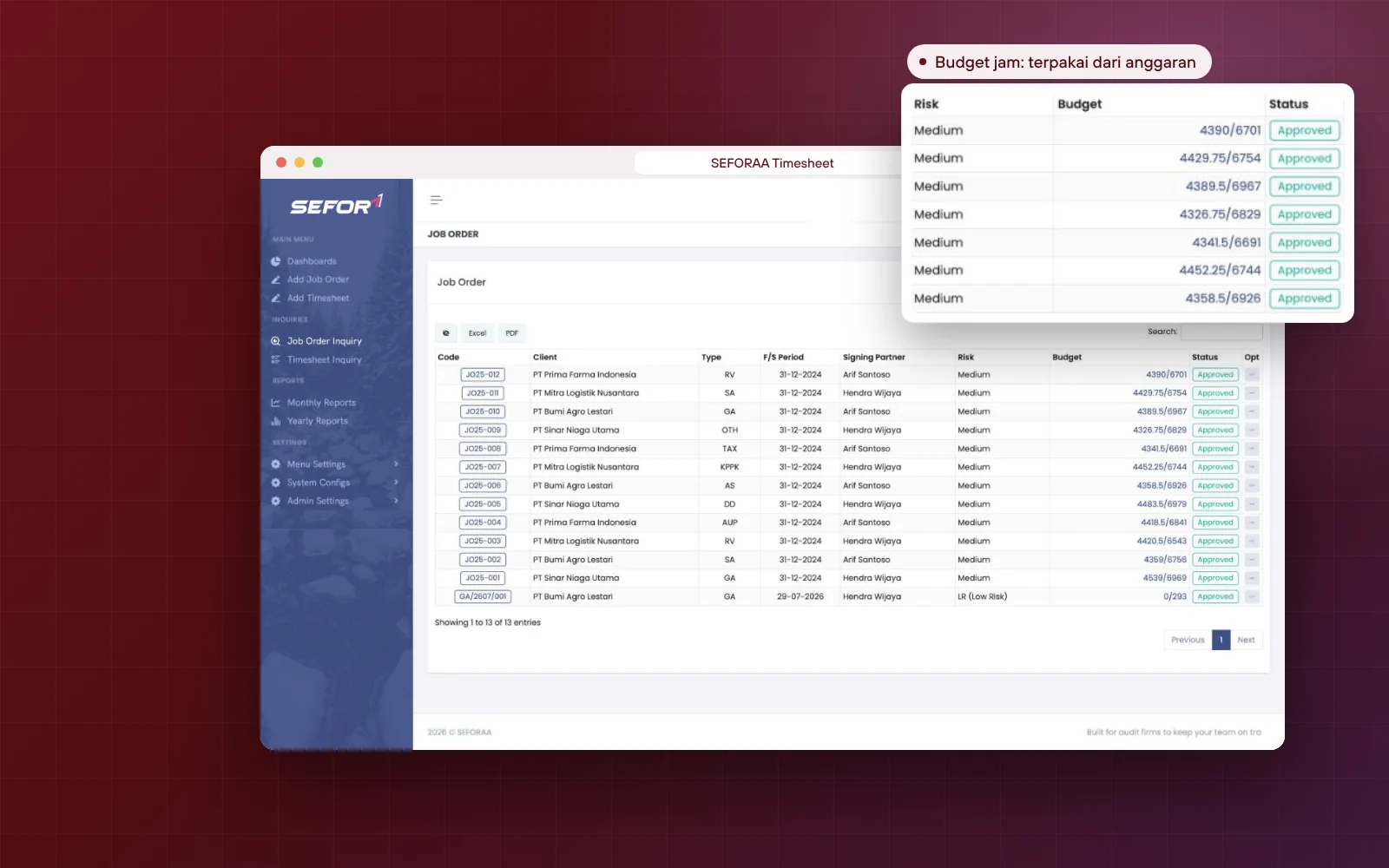
Partners and managers can see hours used against budget at any time, without having to ask the field team for status.
Complete job orders with client risk assessment
Budget per position and automatic recovery rate
Timesheets with Manager, Partner and HR approval
Overtime, meal and transport allowances calculated automatically
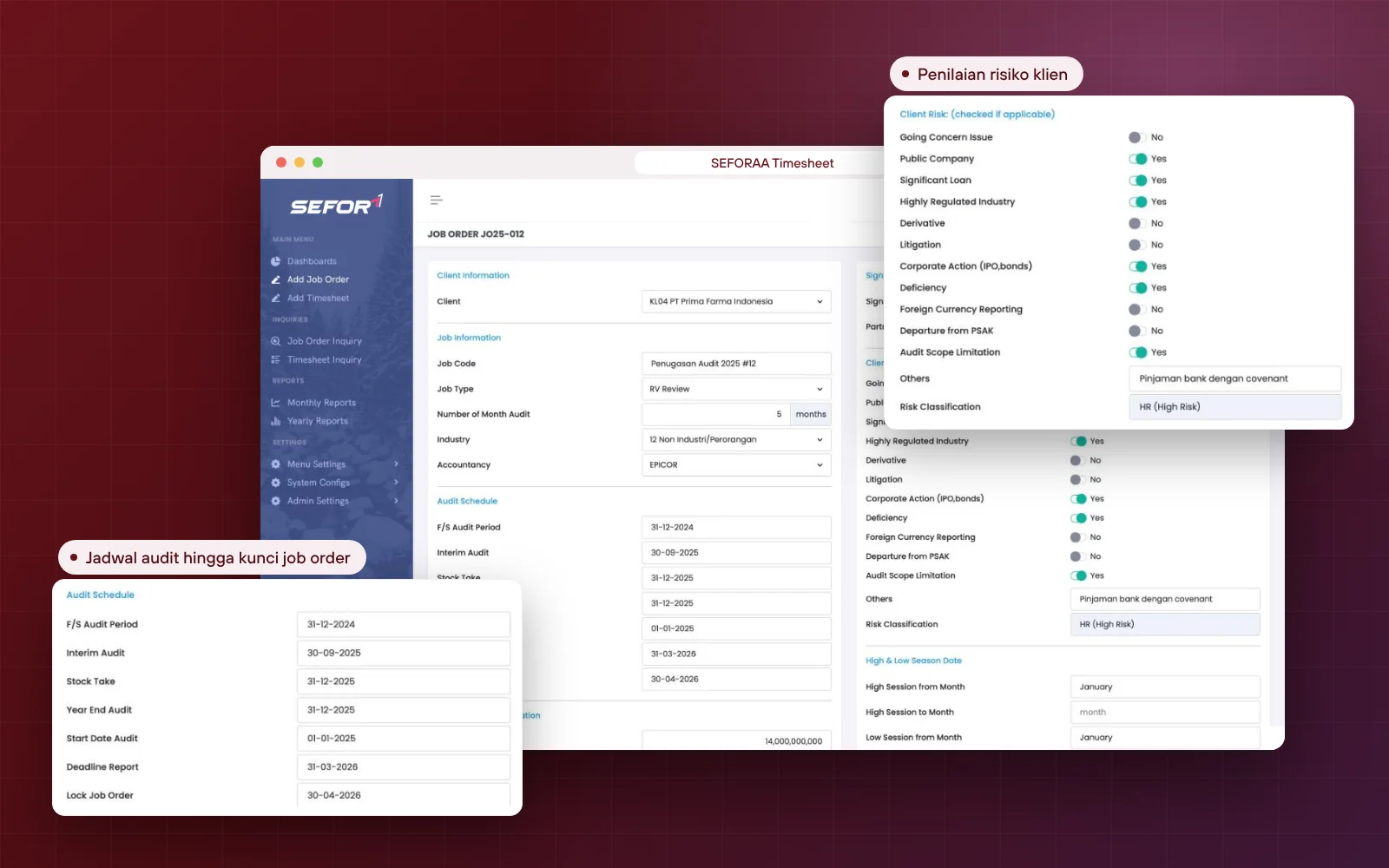
Information that is usually scattered across many files is gathered in one job order, so the partner can assess the engagement before the team starts work.
Service types: general audit, special audit, review, AUP, due diligence and more
Industry and the accounting software the client uses
Interim, stock take, year end and report deadline schedules
Financial summary and last year's audit opinion
Client risk assessment and its risk classification
Signing partner and partner in charge
Job order lock date and automatic lock
Budget and recovery rate
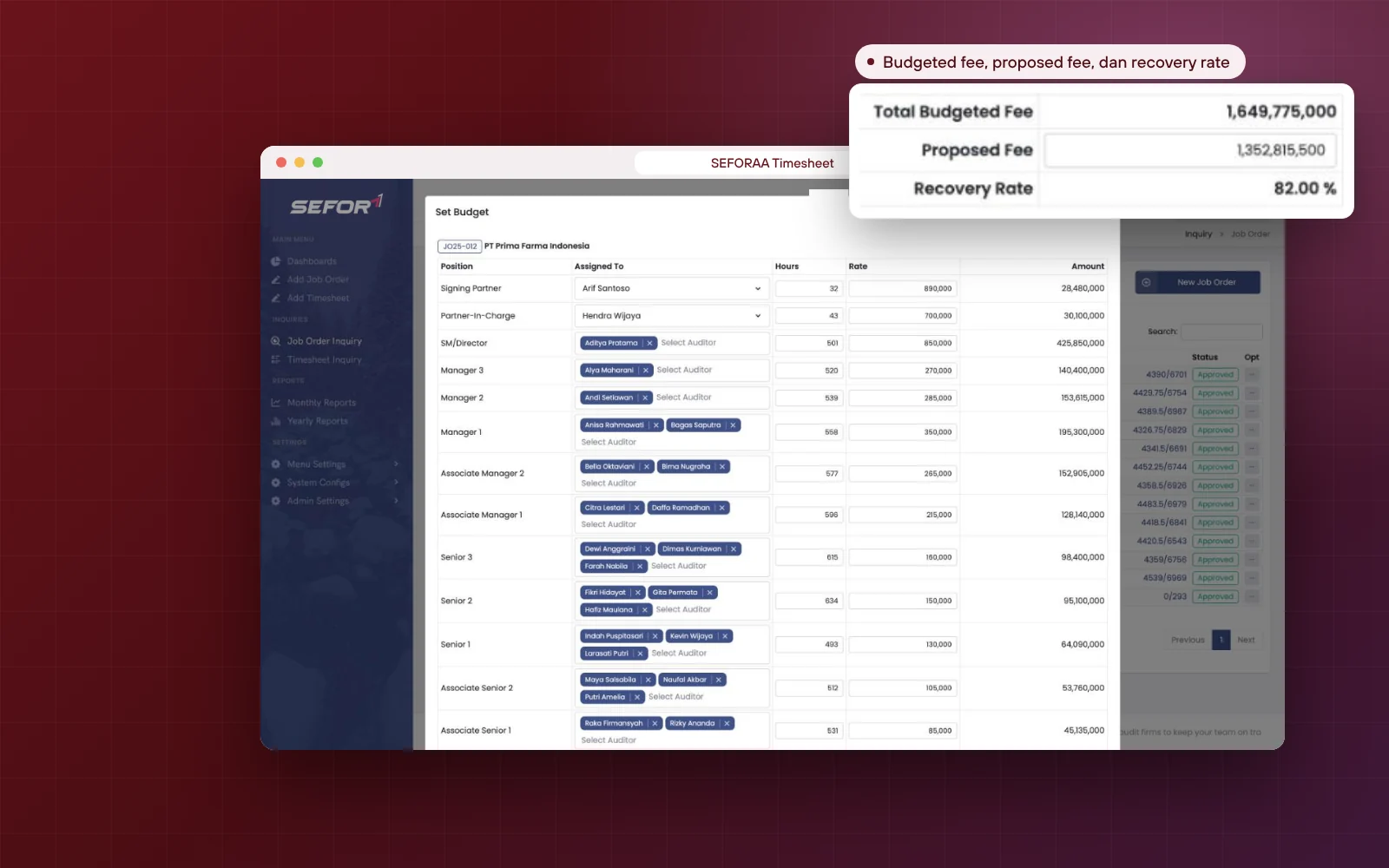
Hour budget per position, recovery rate visible at once
The manager prepares the budget by setting hours and rates for each level, then assigns auditors. The application calculates the budget value and compares it with the fee proposed to the client.
Hours and rates for 17 position levels
One position can be filled by several auditors
Default rate per position that can be adjusted per job order
Total budgeted fee calculated automatically
Recovery rate from the comparison of budgeted fee and proposed fee
Hours used compared with budgeted hours in the job order list
Timesheets and approval
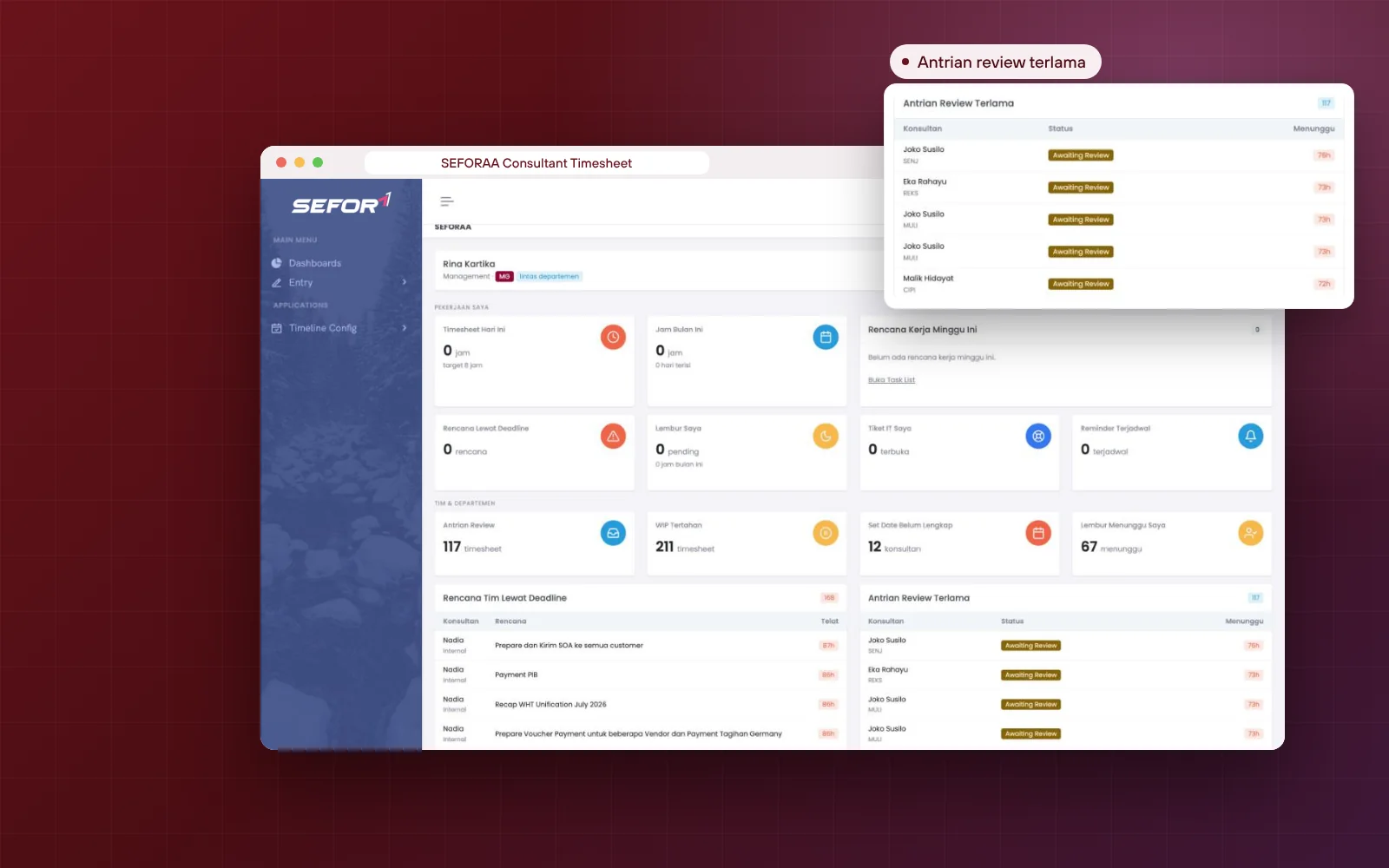
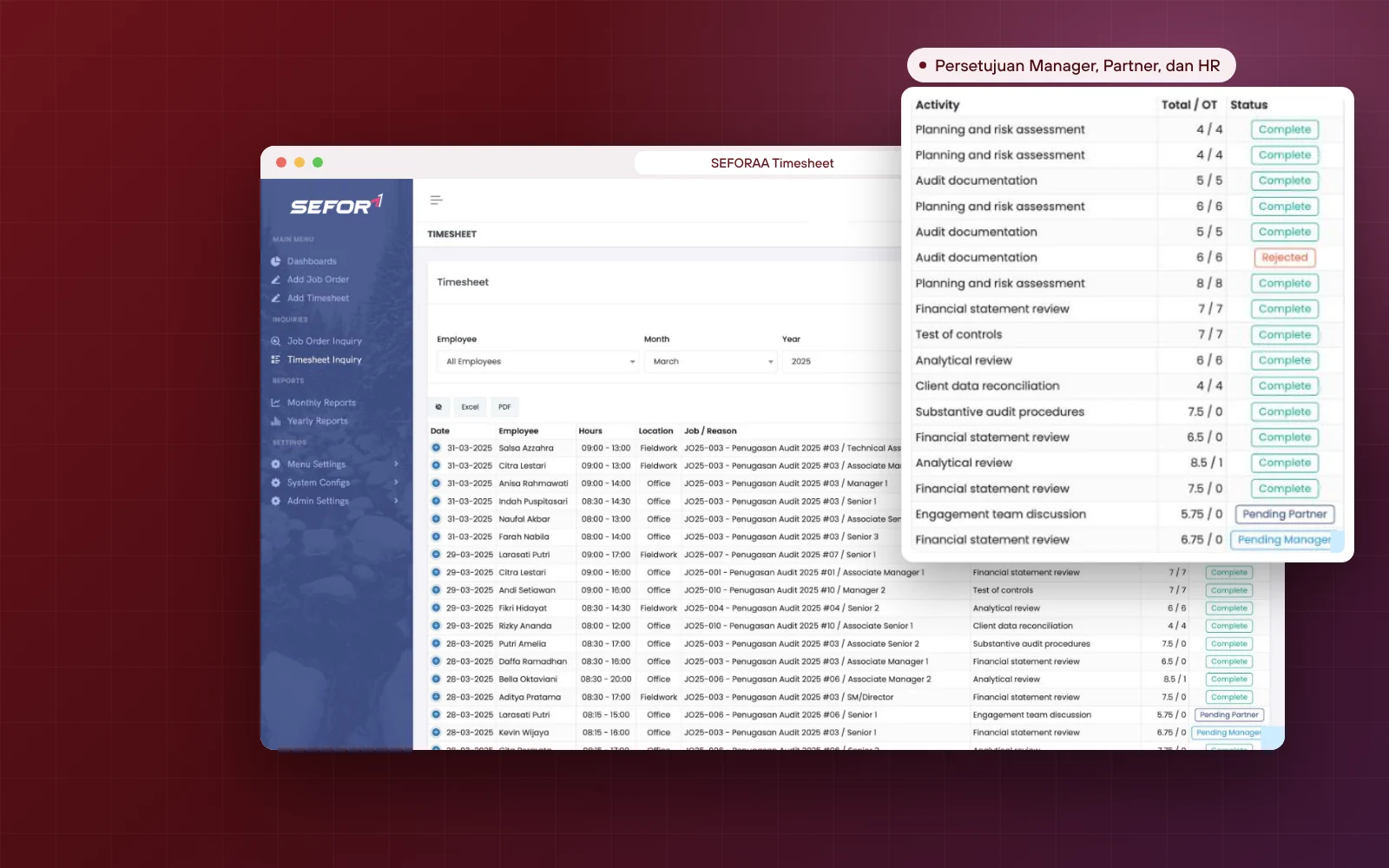
Daily timesheets with overtime and multi-level approval
Auditors record working hours per engagement every day. Overtime is calculated automatically, then timesheets are reviewed by the Manager, Partner and HR before entering reports.
Start and end times with total hours and automatic overtime
Office, fieldwork or non-job location
Restricted date range for timesheet input
Manager, Partner and HR approval
Pending, completed or rejected status
Approval is cancelled automatically if the timesheet is changed
Notification when a timesheet or job order is rejected
Reports and allowances
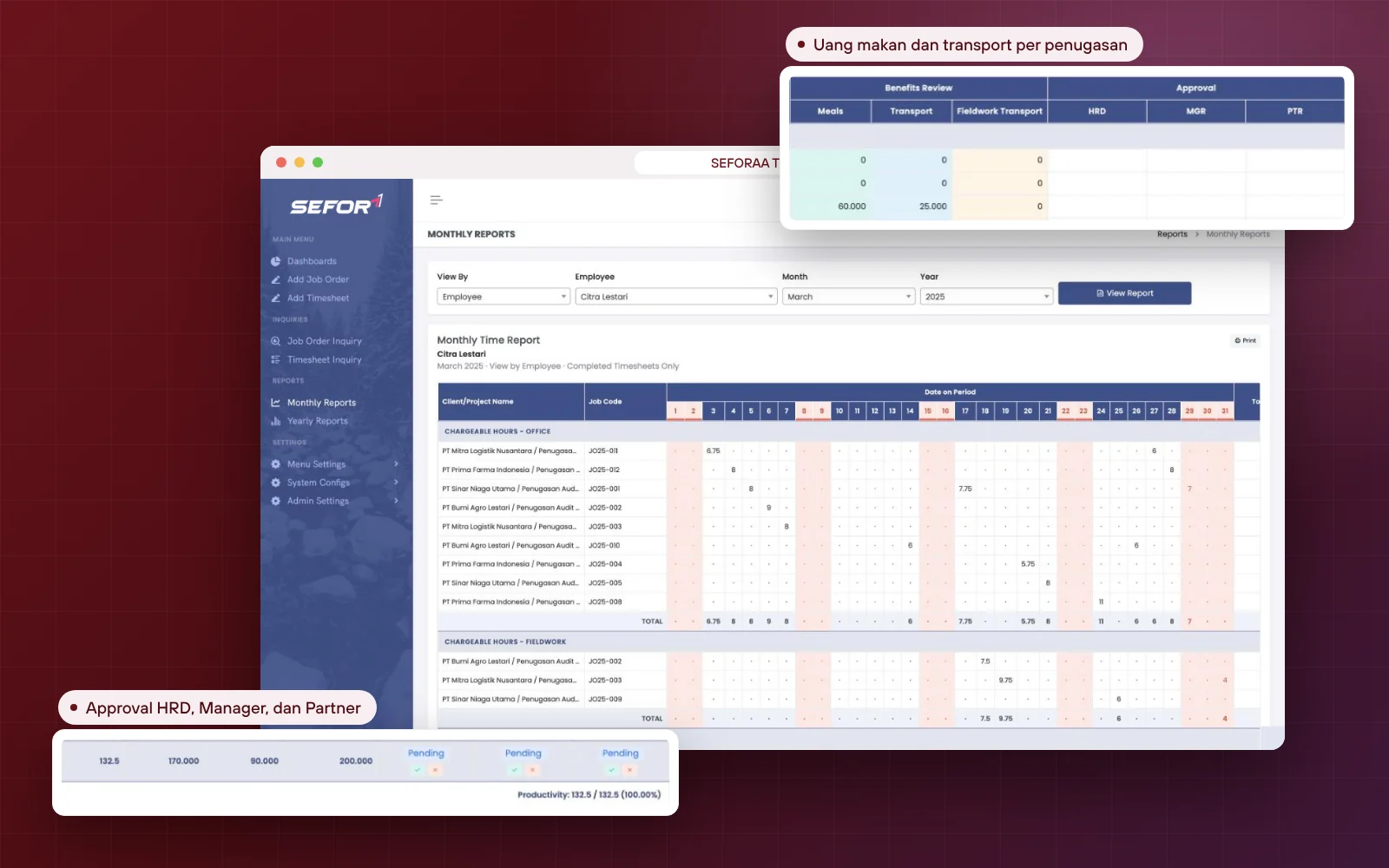
Auditor hours report with meal and transport allowances
Time reports are built from approved timesheets, so the figures used by HR and partners are always the same.
Monthly report per auditor or per client
Annual report for a 12-month period
Chargeable office and fieldwork hours, plus non-chargeable
Total overtime and non-job hours
Meal, transport and fieldwork transport allowances
Productivity of every auditor
Print or export to Excel and PDF
For the whole audit firm team
Structured to follow the levels in a public accounting firm
Every role in the firm gets a view and access rights that match its responsibilities, from the partner who signs the report to the assistant who records daily working hours.
01Partnermonitors budget and recovery rate, and approves timesheets
02Managerprepares budgets, assigns auditors and reviews timesheets
03Senior and assistantsrecord daily working hours per engagement
04HRfinal verification, overtime, meal and transport allowances
05Administratorconfigures working hours, holidays, positions and rates
Settings and customization
A distinctive firm policy? Set it yourself or we adapt it for you
Many policies can be set directly by the administrator without a programmer. For more specific needs, our team can develop them quickly.
What can be configured or developed includes
Service types, industries and the list of client accounting software
Non-job categories according to leave and training policy
Audit stage timeline templates
Positions, levels and auditor rates
Special reports for partners or HR
Additional stages or approval rules
Access security
Protect the firm's data with multi-factor authentication
Engagement data, rates and auditors' working hours are sensitive. SEFORAA Auditor Timesheet supports multi-factor authentication (MFA), with a choice of free MFA or an enterprise-grade MFA service charged as a separate monthly fee. Its use is optional, but we strongly recommend it.
SEFORAA Auditor Timesheet is installed on your firm's server under a perpetual license. Client data, rates and auditors' working hours stay fully under the firm's control.
Perpetual license, not a monthly rentalNot a SaaS subscriptionEngagement data stored on your own server
No server yet?
Hosting by SEFORAA
No server yet? We offer hosting as a separately charged service, so your firm's team can focus on using the application right away.
Four steps we take together with your firm's team, from structure analysis to support after go-live.
01
Step 1
Firm structure analysis
We study your firm's position levels, rates, working hours and overtime policy.
02
Step 2
Configuration and customization
Positions and rates, working hours, holidays, meal and transport allowances, and roles are set up.
03
Step 3
Data migration and training
Auditor, client and ongoing job order data is migrated, then the team is trained.
04
Step 4
Go-live and support
Timesheets run in SEFORAA Auditor Timesheet, with support from our team.
Self-service demo
Try audit firm timesheet software on your own, with sample accounting firm data
The SEFORAA Auditor Timesheet demo uses data from the sample firm KAP Seia, Fortuna, Abadi and Integra: 8 accounts with different roles from Junior Auditor to Managing Partner, 4 clients, 4 job orders and 19 timesheets in every approval status. Read the concept introduction first, then follow the 14 exercises in the guide, from recording a timesheet as an auditor to approving it as HR, Manager and Partner.
How to try
Fill in the form with your work emailPublic emails such as Gmail or Yahoo cannot be used.
Receive the password by emailOur team sends the demo password to your work email.
Log in following the User Guide (PDF)The address and username for login are written in the guide.
Demo data resets every 24 hours, so feel free to explore.
SEFORAA Auditor Timesheet is timesheet and audit engagement management software built specifically for public accounting firms (KAP). The application manages job orders, client risk assessment, hour budgets per position, auditor timesheets, overtime, meal and transport allowances, multi-level approval, through to working hours reports. It is developed by PT Tilyanpristka and marketed by PT SEIA FORTUNA ABADI INTEGRA.
Who is SEFORAA Auditor Timesheet built for?
Specifically for public accounting firms. The position structure, service types (general audit, special audit, review, AUP, due diligence, accounting service, KPPK, plus tax and transfer pricing) and approval flow follow the way audit firms work, from Signing Partner to Technical Assistant.
Is SEFORAA Auditor Timesheet subscription-based (SaaS)?
No. SEFORAA Auditor Timesheet is installed on your firm's server under a perpetual license; modifications, fixes and maintenance are available through SEFORAA's paid annual support service. If your firm does not have a server yet, SEFORAA hosting is available as a separately charged service.
How are budget and recovery rate calculated?
For each job order, hours and rates are set per position, from Signing Partner to Administration, then auditors are assigned to those positions. The application calculates the total budgeted fee, compares it with the proposed fee, and shows the recovery rate automatically.
How does timesheet approval work?
Auditor timesheets are reviewed in sequence by the Manager, Partner and HR, with a pending, completed or rejected status. The approval queue appears on the dashboard, and approval can be set to cancel automatically if a timesheet is changed after it is approved.
Is overtime calculated automatically?
Yes. Overtime is calculated from the working hours configuration, break times, the pause before overtime and the overtime start time. Working hours can differ per period, for example during Ramadan, and national holidays are taken into account.
Are auditors' meal and transport allowances calculated too?
Yes. Rates for meal, transport and fieldwork transport allowances can be set for working days and holidays, complete with a minimum hours threshold. The amounts appear in each auditor's monthly report per engagement.
How are hours not charged to clients recorded?
Non-chargeable hours are recorded under non-job categories, such as leave, sick days, training, self study, proposal preparation, administration and available time. These categories can be adjusted to the firm's policy.
What is the busy and quiet season setting for?
The firm can define busy and quiet season months, the budgeted working hours per day for senior level and below, and a minimum recovery rate for each season, so engagement budgets are more realistic.
Is there a client risk assessment?
Yes. Every job order contains a list of client risks, including going concern, public companies, significant borrowings, highly regulated industries, derivatives, litigation, corporate actions, foreign currency reporting, departure from PSAK and audit scope limitations, along with their risk classification.
Can job orders and timesheets be locked?
Yes. Job orders have a lock date and an automatic lock option, while timesheet input is limited to a certain date range, so data cannot be changed after the period is closed.
What reports are available?
Monthly and annual time reports are available per auditor or per client, containing chargeable hours at the office and in fieldwork, non-chargeable hours, overtime, meal and transport allowances, approval status and productivity. Data can be printed or exported to Excel and PDF.
Does SEFORAA Auditor Timesheet support multi-factor authentication (MFA)?
Yes. Free MFA is available, or an enterprise-grade MFA service charged as a separate monthly fee. Using MFA is optional, but we strongly recommend it because engagement data, rates and auditors' working hours are sensitive firm data.
Can SEFORAA Auditor Timesheet be customized, and how fast?
Yes, and fast. Service types, industries, non-job categories, audit timeline templates, and positions and rates can be set by yourself, while special needs such as additional reports or approval flows can be developed together with our team.
How is the firm's data kept secure?
Access is set per role (Partner, Manager, Auditor and HR) through a permission matrix, and login history can be monitored. Because the application is installed on your firm's server, client data, rates and auditors' working hours stay under internal control.
RaaS Result as a Service
No software to buy. Just receive the results.
Not ready to use new software for administration? Through Result as a Service, the PT Tilyanpristka team can help turn your work data into the reports you need. Contact us to discuss the scope of service that suits your firm.