
Hello, we are SEFORAA.

Contact us to ask about the applications, request a quotation, or schedule a demo. Our team is ready to help during business hours.

Schedule a demo

Follow us

SEFORAA Invoicing: invoicing and receivables software for companies

Issue invoices, send e-Faktur to Coretax, record payments and keep receivables under control until they are settled, all in one application installed on your server under a perpetual license.

Invoicing software from practitioners

From quotation to settlement in one application

SEFORAA Invoicing is developed by PT Tilyanpristka, a provider of accounting and tax compliance BPO services since 2004. The application covers the whole sales cycle: quotation, sales order, delivery, invoice, payment, through to collecting overdue receivables.

The finance team no longer needs to copy data between files, and every invoice carries the right tax calculation from the moment it is issued.

  • Quotation, sales order, delivery and invoice linked to each other
  • VAT 12% and e-Faktur to Coretax through a PJAP (separate monthly fee)
  • Recurring invoices issued automatically on schedule
  • Receivables aging and collection on one screen
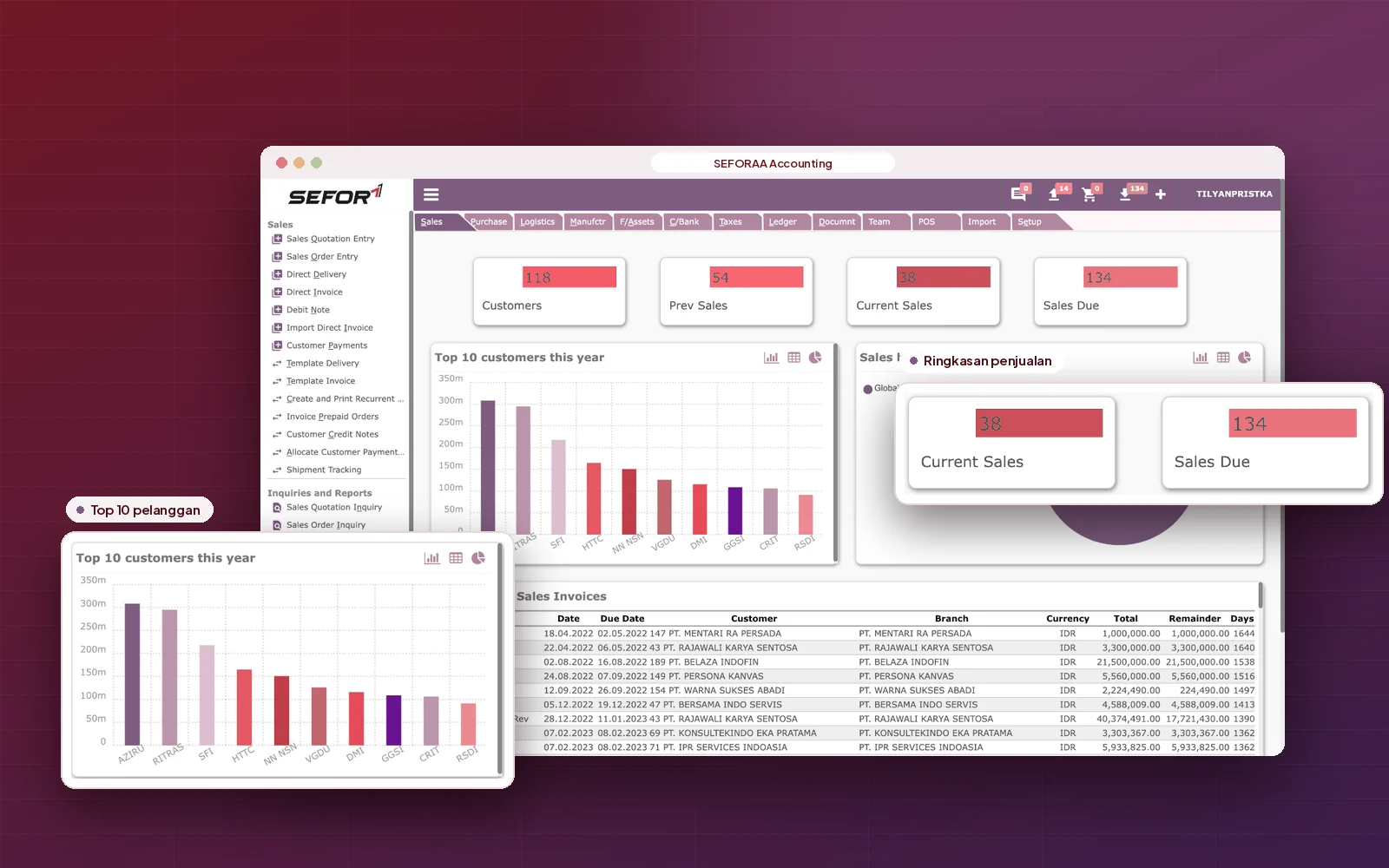
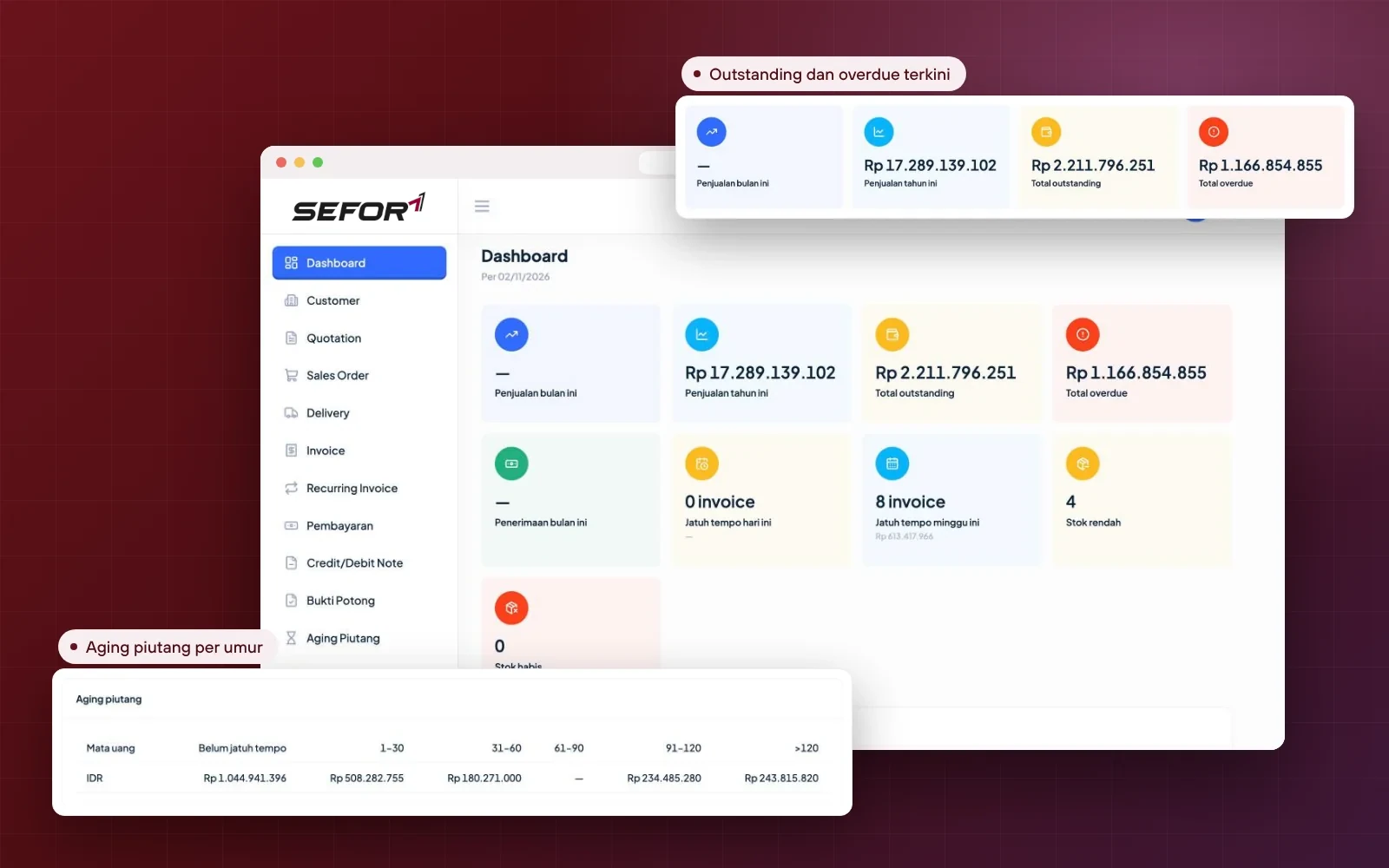
SEFORAA Invoicing dashboard: sales, outstanding, overdue and receivables aging

Why SEFORAA Invoicing

Four reasons to choose SEFORAA Invoicing

  • One flow, no re-entry

    Quotation, sales order, delivery, invoice and payment are linked to each other.

    QuotationSales orderInvoice
  • Tax rules ready

    VAT 12%, Coretax e-Faktur and PPh withholding slips in one flow.

    VAT 12%e-FakturPPh
  • Receivables under control

    Aging, payment promises and collection escalation are monitored every day.

    AgingPayment promise
  • Yours, not rented

    Installed on your server under a perpetual license, not a SaaS subscription.

    Perpetual licenseYour server

SEFORAA Invoicing features

Complete features for billing and receivables

Filter by group to see the features most relevant to your team.

  • Customers and customer groups

    NPWP/NIK, NITKU, taxable entrepreneur (PKP) status, credit limit, payment terms, price list, plus billing and delivery addresses.

    Sales & invoices
  • Quotations and revisions

    Quotations with validity periods, recorded revisions, and status through to conversion into a sales order.

    Sales & invoices
  • Sales orders and deliveries

    Customer orders and delivery notes from the warehouse, then billed without re-entry.

    Sales & invoices
  • Standard and milestone invoices

    Discounts per line and per document, prices including or excluding VAT, plus staged billing by milestone.

    Sales & invoices
  • Recurring invoices

    Routine billing from daily to yearly that is issued automatically or as drafts for review.

    Sales & invoices
  • Payments and advances

    Bank transfer or giro/cheque, allocated to one or many invoices, including advances.

    Payments & receivables
  • Credit notes and debit notes

    Corrections to the value of an issued invoice, complete with its tax.

    Payments & receivables
  • VAT and e-Faktur

    VAT 12% with other-value tax base, luxury goods sales tax (PPnBM), and e-Faktur to Coretax through a PJAP (separate monthly fee).

    Tax
  • PPh withholding slips

    PPh 23 and PPh 4(2) withheld by customers are recorded, then matched against their withholding slips.

    Tax
  • Aging and statements

    Receivables aging per customer, branch and currency, plus customer statements per period.

    Payments & receivables
  • Collection

    Collector, collection status, payment promises and follow-up schedule for every overdue invoice.

    Payments & receivables
  • Write-off with approval

    Uncollectible receivables are written off through a recorded request and approval.

    Payments & receivables
  • Multiple branches and currencies

    Documents per company branch, with invoices in rupiah or foreign currencies.

    Control & reports
  • Items, price lists and stock

    Catalog of goods and services, prices per customer, plus stock per location with low-stock warnings.

    Sales & invoices
  • PDF and email invoices

    PDF invoices with amount in words, sent directly to the customer's email, with delivery history.

    Sales & invoices
  • Reports, export and import

    Sales, receivables, inventory and tax reports, plus initial data import from CSV or Excel.

    Control & reports
  • Access rights and audit trail

    Role and permission per user, plus an audit trail on every document.

    Control & reports

Need a feature that is not listed?

Discuss your needs

Closer look

From quotation to fully paid receivables.

Quotation to invoice

From quotation to invoice without re-entry

Customer, item, price and tax data is carried from one document to the next, so the invoice always matches the quotation and the goods delivered.

  1. Quotations with validity periods and recorded revisions
  2. Convert quotation to sales order, delivery, then invoice
  3. Milestone invoices for contracts or work orders (SPK)
  4. Discounts per line or per document
  5. Prices including or excluding VAT
  6. Payment terms from COD to Net 60 days
  7. Automatic document numbers per month
  8. PDF invoice with amount in words, sent by email
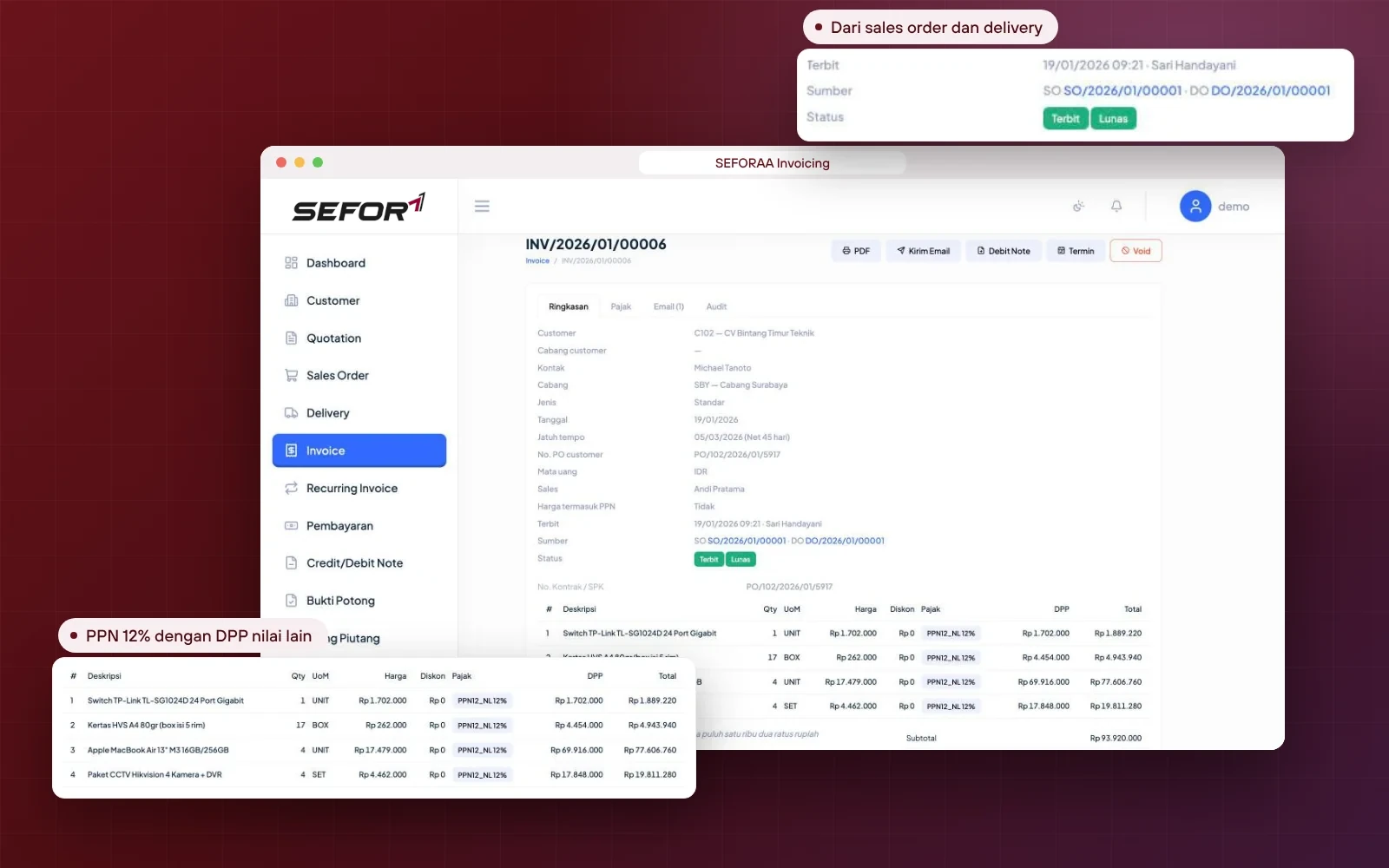
Invoice in SEFORAA Invoicing generated from a sales order and delivery, with VAT 12% on other-value tax base

VAT, e-Faktur and PPh

VAT, e-Faktur and PPh withholding slips in one flow

Tax is calculated from the moment the invoice is created and connected to Coretax through the API of a PJAP (tax application service provider, separate monthly fee), developed by a team that handles clients' tax compliance every month.

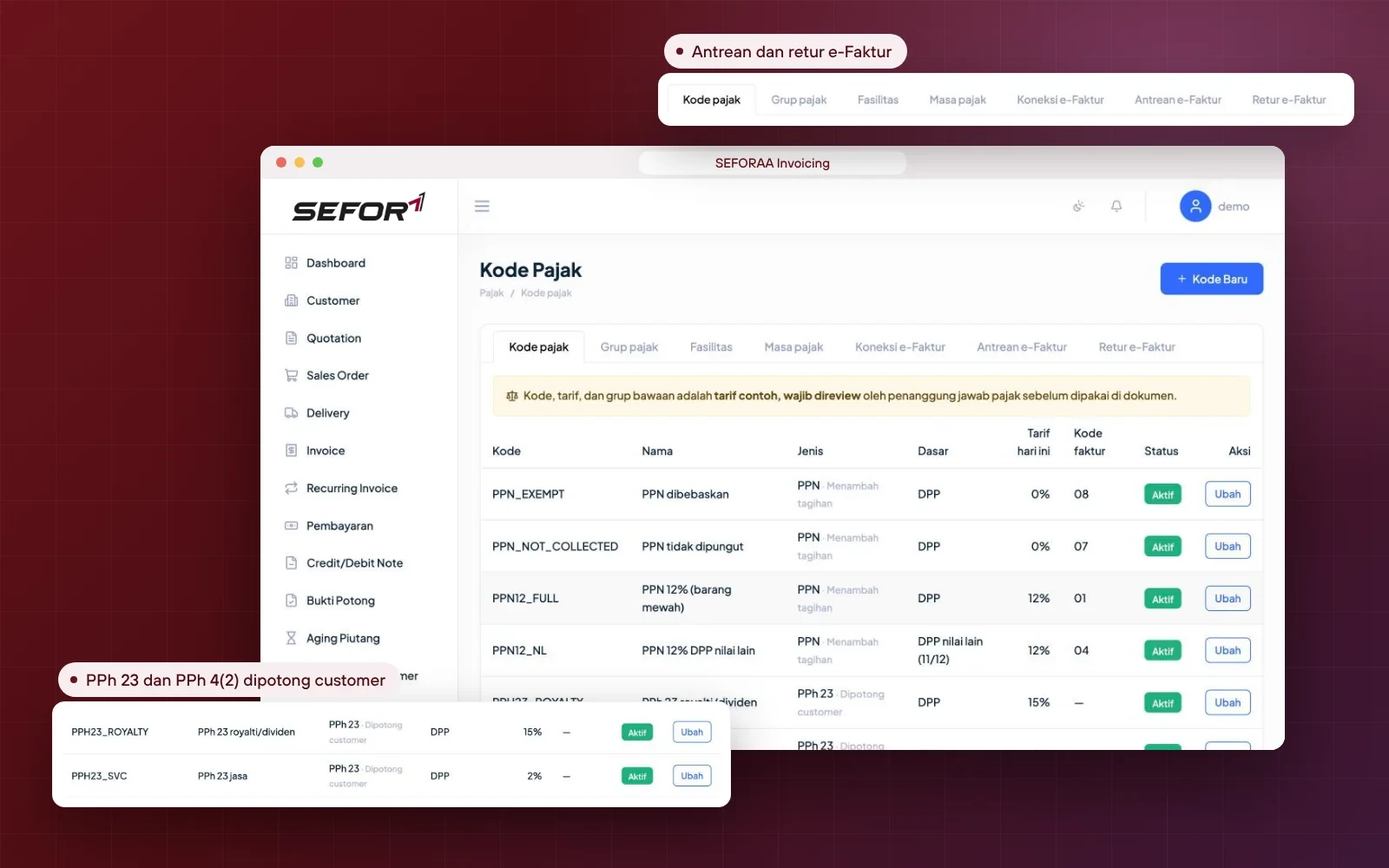
  1. VAT 12% with other-value tax base (11/12) and luxury goods sales tax (PPnBM)
  2. Exempt VAT and VAT not collected, with the appropriate invoice codes
  3. e-Faktur sent to Coretax through a queue, including returns
  4. VAT collected for state-owned enterprise (BUMN) and government agency customers
  5. PPh 23 and PPh 4(2) withheld by customers
  6. Withholding slip matching: not yet received or not matching
  7. Tax rates follow the document date
  8. Output VAT report and PPh withheld by customers
VAT and PPh tax codes and the e-Faktur menu in SEFORAA Invoicing

Recurring and payments

Routine billing issues itself, payments are recorded neatly

Maintenance, rental or retainer contracts only need to be set up once. Subsequent invoices are issued on schedule, and every payment is allocated straight to the right invoice.

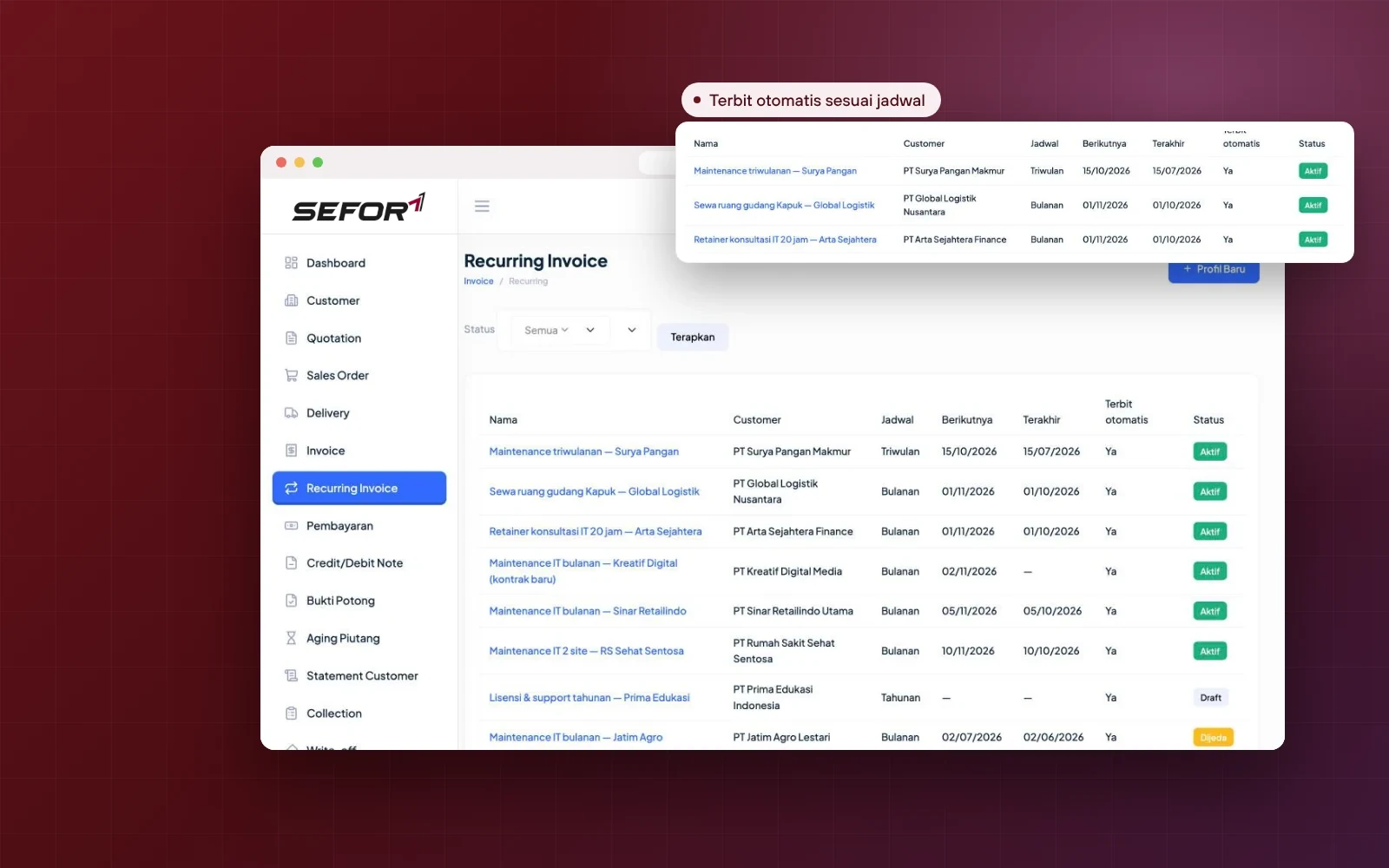
  1. Daily, weekly, monthly, quarterly or yearly schedules
  2. Flexible intervals, for example every two months
  3. Issued automatically or as drafts for review
  4. Email sent automatically after the invoice is issued
  5. Bank transfer and giro/cheque payments
  6. Advances allocated to subsequent invoices
Recurring invoice list in SEFORAA Invoicing with schedules and automatic issue status

Receivables and collection

Receivables monitored, collection better targeted

The dashboard shows outstanding, overdue and invoices due this week. The collection team works from one list with clear status and follow-up schedules.

  1. Receivables aging: not yet due to more than 120 days
  2. Aging per branch and per currency
  3. Customer statements per period
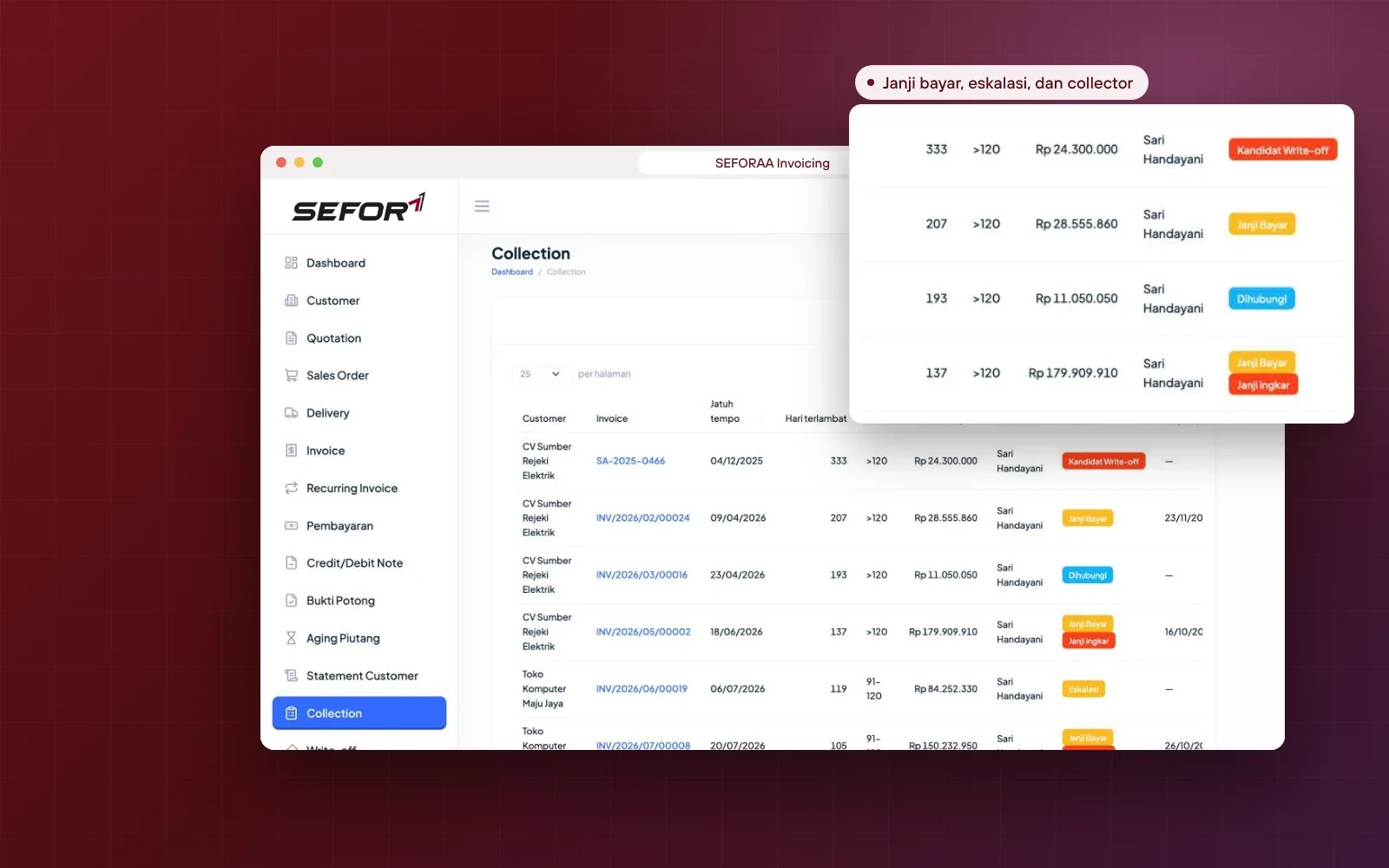
  4. Collector, collection status and payment promises
  5. Broken-promise flags and escalation
  6. Credit limit and credit days per customer
  7. Write-off with request and approval
Collection list in SEFORAA Invoicing with days overdue, collector and payment promise status

For many business models

Suited to service, trading and project companies

Every business model bills in a different way. SEFORAA Invoicing provides a flow for each, without forcing one pattern on all.

  1. Subscription services and maintenance contractsrecurring invoices
  2. Trading and distributionsales orders, deliveries, stock and price lists
  3. Projects and contractsadvances, milestone invoices and work order (SPK) numbers
  4. State-owned enterprise and agency customersVAT collected and withholding slips
  5. Many branchesdocuments, aging and statements per branch

Customization and integration

A distinctive invoice format and billing flow? Customization is fast

Every company has its own way of billing. Because it was developed by a team that handles the varied transactions of BPO clients, SEFORAA Invoicing is used to being adapted, so customization for your company can be done faster.

Can be adapted or developed together with our team

  • PDF invoice and quotation layouts matching your company identity
  • Document numbering formats
  • Multi-level approval before an invoice is issued
  • Import transactions from a sales system, POS or e-commerce
  • Custom sales and receivables reports

Installation

Choose the installation that suits you

Main option

Installed on your own server

SEFORAA Invoicing is installed on your company's server under a perpetual license. Customer, sales and receivables data stays fully under company control.

Perpetual license, not a monthly rentalNot a SaaS subscriptionSales data stored on your own server

No server yet?

Hosting by SEFORAA

No server yet? We offer hosting as a separately charged service, so your finance team can focus on using the application right away.

Discuss with us

Implementation

From analysis to billing running.

Four steps we take together with your finance team, from billing policy to opening receivables balances per invoice.

  1. Step 1

    Billing process analysis

    We study your sales flow, payment terms, tax treatment and the way your company bills.

  2. Step 2

    Configuration and customization

    Tax codes, numbering, document formats and access rights are adapted, including special needs.

  3. Step 3

    Data migration and opening balances

    Customers, items and stock are imported, then opening receivables balances are recorded per invoice.

  4. Step 4

    Go-live and support

    Billing runs in SEFORAA Invoicing, with support from our team.

Self-service demo

Try invoicing and receivables software on your own, with sample company data

The SEFORAA Invoicing demo uses data from PT Demo Niaga Nusantara, a sample IT equipment distributor with 2 branches, 8 accounts from Sales to Finance, about 19 customers, and hundreds of quotations, invoices and payments since early 2026. Read the concept introduction first, then follow the 14 exercises in the guide, from creating a quotation and issuing an invoice to reading receivables aging.

How to try

  1. Fill in the form with your work emailPublic emails such as Gmail or Yahoo cannot be used.
  2. Receive the password by emailOur team sends the demo password to your work email.
  3. Log in following the User Guide (PDF)The address and username for login are written in the guide.

Demo data resets every 24 hours, so feel free to explore.

Request a demo password

Prefer to be guided? Schedule a demo with a sample company, from quotation and invoice through to payment, collection and receivables aging.

Frequently asked questions

About SEFORAA Invoicing

More questions? See the Pricing page or contact us.

What is SEFORAA Invoicing?

SEFORAA Invoicing is invoicing and receivables software for managing the whole sales cycle: quotation, sales order, delivery, invoice, recurring invoice, payment, credit/debit note, VAT and e-Faktur, PPh withholding slips, through to receivables aging and collection. It is developed by PT Tilyanpristka and marketed by PT SEIA FORTUNA ABADI INTEGRA for mid-sized companies.

What is the difference between invoicing software and accounting software?

Invoicing software focuses on the sales and receivables cycle, from quotation, issuing invoices and their tax through to payment and collection. Accounting software covers broader bookkeeping, such as the general ledger, accounts payable, inventory and financial reports. SEFORAA Invoicing focuses on that sales and receivables cycle.

Is SEFORAA Invoicing subscription-based (SaaS)?

No. SEFORAA Invoicing is installed on your company's server under a perpetual license; modifications, fixes and maintenance are available through SEFORAA's paid annual support service. If your company does not have a server yet, SEFORAA hosting is available as a separately charged service.

Does it support VAT 12% with other-value tax base?

Yes. Tax codes are available for VAT 12% with other-value tax base (11/12), VAT 12% for luxury goods, exempt VAT, VAT not collected, and luxury goods sales tax (PPnBM). Rates are taken according to the document date, and the default codes and rates can be reviewed by the company's tax officer before use.

Does SEFORAA Invoicing connect to Coretax for e-Faktur?

Yes. Tax invoices from issued invoices are sent to Coretax through the API of a PJAP (tax application service provider, separate monthly fee) via the e-Faktur queue, including e-Faktur returns for return notes.

Is there a monthly fee for the Coretax connection?

Yes. The Coretax connection uses a PJAP (tax application service provider) service that is charged as a separate monthly fee. The SEFORAA license itself is perpetual with no subscription fee; other recurring fees apply only to annual support and to hosting by SEFORAA if you choose it.

How are PPh 23 or PPh 4(2) withheld by customers recorded?

PPh withheld by the customer is calculated on the invoice so the net amount received is visible straight away. Withholding slips from customers are recorded and matched against the expected PPh, so slips that have not been received or whose amounts do not match are easy to follow up.

Can I bill state-owned enterprises or government agencies that collect VAT?

Yes. Customers can be flagged as VAT collectors and PPh withholders, so the invoice shows the VAT collected and the PPh withheld, along with the net amount to be received.

Can I create recurring invoices for routine billing?

Yes. Recurring invoice profiles can be scheduled daily, weekly, monthly, quarterly or yearly with a set interval. Invoices can be issued automatically or created as drafts for review, then emailed to the customer automatically.

Does it support advances and milestone invoices?

Yes. Advances from customers are recorded and allocated to subsequent invoices, and invoices can be billed in stages according to contract or work order (SPK) milestones.

How does SEFORAA Invoicing help collect receivables?

Receivables are monitored through aging by age, customer statements and the collection list. Every overdue invoice has a collector, a status (contacted, payment promised, escalated), a payment promise date and a follow-up schedule. Uncollectible receivables can be submitted for write-off with approval.

Does it support multiple branches and currencies?

Yes. Documents can be issued per company branch, and invoices can be created in rupiah or foreign currencies such as USD, SGD, EUR and JPY. Aging and statements can be shown per branch and per currency.

How do I move data from an old system?

Customer data, customer branches, items and opening stock can be imported from CSV or Excel files using the available templates. Opening receivables balances are recorded per invoice so aging and collection can run right away.

Can SEFORAA Invoicing be customized, and how fast?

Yes, and fast. The application is developed by a team that handles the varied transactions of PT Tilyanpristka's BPO clients, so adjustments to document formats, billing flows or special reports can be done faster.

How is sales and receivables data kept secure?

Access is limited by user role, and every document has an audit trail. Because the application is installed on your company's server, customer, sales and receivables data stays under the company's internal control.

RaaS Result as a Service

No software to buy. Just receive the results.

Through Result as a Service, the PT Tilyanpristka BPO team can handle the recording of invoices, payments and receivables recaps for your company. You simply receive ready-to-use recaps, without buying invoicing software and without repeated data entry.

Learn about RaaS (opens in a new tab)

PT Tilyanpristka services since 2004